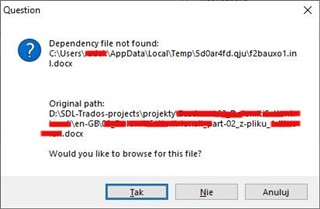
Dependencies file not founded

Dear Colleagues of gateway or translators,

I cannot export the translated files or even open the files to translate, yes I can open them but the trados ask me for browsing for a file, which I do no know where to find and what it is.

The error say dependencies files not founded.

Can anyone of you help me to solve this problem?, please Paul can you help me with this problem?

Thanks before hand.

Parents
  • Hello Everyone in this discussion,

    I had a similar problem as shown on the image, which was popped up on opening the file for translation. It might have been caused by CCleaner or Avast Cleanup Premium as I was using both around the same time the problem appeared. Whatever the reason, as this seems to be a temporary file out of the project's directory, Studio should be able to rebuilt it (even if some recent unsaved data could be lost), I believe, and this is not suggested in the dialogue, nor it happens. I believe simple closing and reopening the project should help - I did not try this however.

    In my case I did not notice any other error (besides the error message), till now. I could continue translating and the Save target as function was working fine.

    I reinstalled both Studio and Multiterm, as suggested here, and the error persisted. Finally I followed the link posted here by , clicked YES at the error message dialogue and selected the source file in the project's directory where the Studio had copied the file from its original location when I was creating the project at the beginning of the work. This solved the problem, it seems.

    I hope the same will help in your case, , although it seems yours case is more serious.

    Radek

Reply
  • Hello Everyone in this discussion,

    I had a similar problem as shown on the image, which was popped up on opening the file for translation. It might have been caused by CCleaner or Avast Cleanup Premium as I was using both around the same time the problem appeared. Whatever the reason, as this seems to be a temporary file out of the project's directory, Studio should be able to rebuilt it (even if some recent unsaved data could be lost), I believe, and this is not suggested in the dialogue, nor it happens. I believe simple closing and reopening the project should help - I did not try this however.

    In my case I did not notice any other error (besides the error message), till now. I could continue translating and the Save target as function was working fine.

    I reinstalled both Studio and Multiterm, as suggested here, and the error persisted. Finally I followed the link posted here by , clicked YES at the error message dialogue and selected the source file in the project's directory where the Studio had copied the file from its original location when I was creating the project at the beginning of the work. This solved the problem, it seems.

    I hope the same will help in your case, , although it seems yours case is more serious.

    Radek

Children
No Data