What is wrong with my XML file type?

A client sent me this xml file type that I created for them a few years ago and wanted it updated to include more nodes. This type was most likely created in Studio 2011.

So I loaded this file type to File > Options > File types, added two xpaths to include new nodes and checked through preview that it works.

However, when I want to create a new project, the file type is not available, even though it is there when I check File > Options > File types, even after exiting and restarting Studio 2017.

The problematic XML file type can be viewed here: https://drive.google.com/file/d/0B0OnLYVbo41ZTWpWQk9lRU5Fanc/view?usp=sharing

Parents Reply Children
  • Please go to File -> Setup -> Project templates, chose the proper template and edit it to add the file type there.

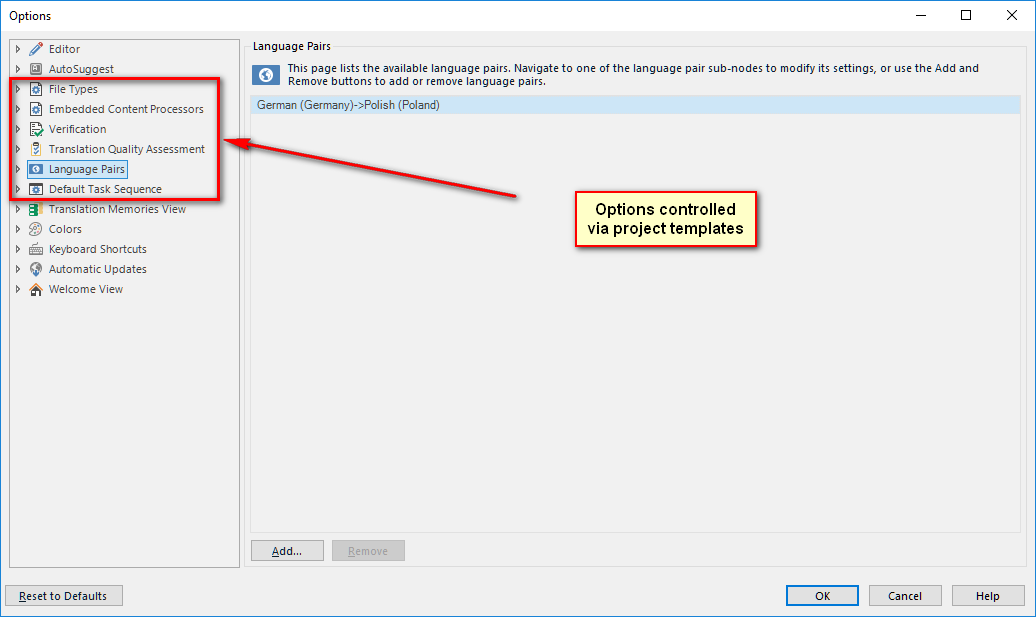
    File types and other changes applied via File -> Options do not affect project templates. Please look here: 

    In a nutshell: options under "File -> Options" are linked with the default template in your system and apply to single file projects. All other projects are created via templates and have individual settings. This applies to the following groups of settings:

    _________________________________________________________

    When asking for help here, please be as accurate as possible. Please always remember to give the exact version of product used and all possible error messages received. The better you describe your problem, the better help you will get.

    Want to learn more about Trados Studio? Visit the Community Hub. Have a good idea to make Trados Studio better? Publish it here.