 Translate



With the default setting, Excel file is imported into Trados line first (A1, B1, C1, .. A2, B2, ..)
How can I make Trados read Excel file column first (A1, A2, A3, .. B1, B2, ..)?

RWS Community
With the default setting, Excel file is imported into Trados line first (A1, B1, C1, .. A2, B2, ..)
How can I make Trados read Excel file column first (A1, A2, A3, .. B1, B2, ..)?
Hi
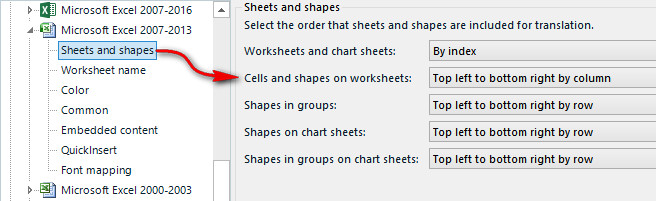
If you use the Microsoft Excel 2007 - 2013 filetype in Studio then you can set this up using the "Sheets and shapes" options.
Paul Filkin | RWS
Design your own training!
You've done the courses and still need to go a little further, or still not clear?
Tell us what you need in our Community Solutions Hub


Paul Filkin | RWS
Design your own training!
You've done the courses and still need to go a little further, or still not clear?
Tell us what you need in our Community Solutions Hub
Hi Paul,
Now that this facility is no longer (in Studio 2021), I suppose that there is another way to do this, but I haven't found it. Can you help?
Now that this facility is no longer (in Studio 2021), I suppose that there is another way to do this, but I haven't found it. Can you help?
There isn't one. In January 2019 I discussed this with the filetype manager as I wondered why this had been removed. The response was:
"...it’s making it all very complicated for very little benefit – since we removed that option I didn’t see any requirement for adding it."
As far as I'm aware we are now two years further on and your post is the first comment I have seen on this. So I think he was probably right. Why do you need to be able to do this?
Paul Filkin | RWS
Design your own training!
You've done the courses and still need to go a little further, or still not clear?
Tell us what you need in our Community Solutions Hub

Now that this facility is no longer (in Studio 2021), I suppose that there is another way to do this, but I haven't found it. Can you help?There isn't one. In January 2019 I discussed this with the filetype manager as I wondered why this had been removed. The response was:
"...it’s making it all very complicated for very little benefit – since we removed that option I didn’t see any requirement for adding it."
As far as I'm aware we are now two years further on and your post is the first comment I have seen on this. So I think he was probably right. Why do you need to be able to do this?
I am surprised to hear that because I just did this with an Excel file (read content by columns instead of by lines):
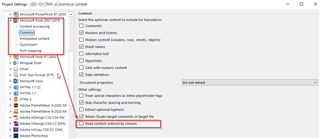
Or did I misunderstand the question?
Daniel
Now that this facility is no longer (in Studio 2021), I suppose that there is another way to do this, but I haven't found it. Can you help?There isn't one. In January 2019 I discussed this with the filetype manager as I wondered why this had been removed. The response was:
"...it’s making it all very complicated for very little benefit – since we removed that option I didn’t see any requirement for adding it."
As far as I'm aware we are now two years further on and your post is the first comment I have seen on this. So I think he was probably right. Why do you need to be able to do this?
I am surprised to hear that because I just did this with an Excel file (read content by columns instead of by lines):
Or did I misunderstand the question?
Daniel
I am surprised to hear that because I just did this with an Excel file (read content by columns instead of by lines):
Not quite the same as this:
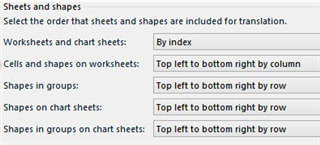
Expanding to this:

A lot more complex than the simple option that was actually added later on but still doesn't go as far as this. Having said that perhaps you are right insofar as what Mats Linder is looking for?
Paul Filkin | RWS
Design your own training!
You've done the courses and still need to go a little further, or still not clear?
Tell us what you need in our Community Solutions Hub