 Translate



I WANT TO ADD A NEW LANGUAGE PAIR.
IT IS NOT VISIBLE.
IS THERE A PRACTICAL WAY TO ADD OR REMOVE PAIRS.

I WANT TO ADD A NEW LANGUAGE PAIR.
IT IS NOT VISIBLE.
IS THERE A PRACTICAL WAY TO ADD OR REMOVE PAIRS.

Update:
Editing registry to remove 5 languages from Studio Freelance version (NB not necessary with Studio Professional)
Close all SDL products.
In your 'Type here to search' window at bottom left of your screen, type 'regedit'.
Open the Registry Editor.
Either search manually:
The actual address is HKEY_CURRENT_USER\Software\Microsoft\LDSRClient5
Or click on 'Edit > Find' or use Ctrl+F
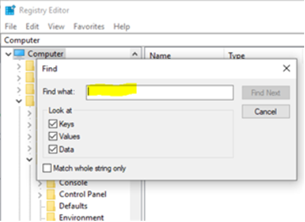
In the box that appears, type 'LDSRClient5' for Studio 2017 then hit 'Find'
(it would be 'LDSRClient15' for Studio 2019 -1,2,3or4 for earlier versions)
The search will take a while as the registry is very long and very complex:
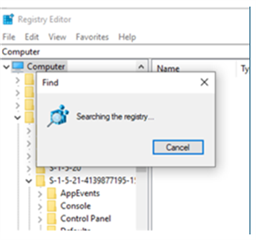
When the registry key appears, right-click on it and select 'rename'.
Add 'old' to the end of the LDSRClient5 name.
Close the registry.
Open Studio and you should find that it prompts you to add your 5 languages again. Note that you don't need to add more than one variant of any language as all other variants of that language will work once it has been added.
Only do this if you feel confident enough to change your PC registry. If not, contact installation support here:
Fill out the form, tick 'Installation' on the Case Type dropdown menu, explain your problem, quote this post as they may not know how to do the above, and give them an accurate email address to contact you on and they can access your computer to change that setting for you.
All the best,
Ali

Thank you so much for this solution. It worked immediately. After spending 4 hours uninstalling, installing, working with the SDL Freshstart app, this finally worked to let me change the languages. I only have to say how frustrating it is at times like these to work with Trados and these "quirks" that keep you running around in circles until you finally find the ONE person who can provide assistance.

Hi Karen Sommer
You're welcome. I'm so glad I was able to help!
All the best,
Ali 
Hi Karen Sommer
You're welcome. I'm so glad I was able to help!
All the best,
Ali