 Translate



I WANT TO ADD A NEW LANGUAGE PAIR.
IT IS NOT VISIBLE.
IS THERE A PRACTICAL WAY TO ADD OR REMOVE PAIRS.

I WANT TO ADD A NEW LANGUAGE PAIR.
IT IS NOT VISIBLE.
IS THERE A PRACTICAL WAY TO ADD OR REMOVE PAIRS.

Update:
Editing registry to remove 5 languages from Studio Freelance version (NB not necessary with Studio Professional)
Close all SDL products.
In your 'Type here to search' window at bottom left of your screen, type 'regedit'.
Open the Registry Editor.
Either search manually:
The actual address is HKEY_CURRENT_USER\Software\Microsoft\LDSRClient5
Or click on 'Edit > Find' or use Ctrl+F
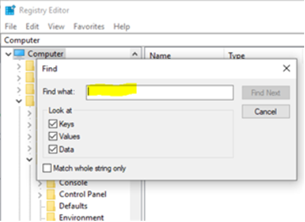
In the box that appears, type 'LDSRClient5' for Studio 2017 then hit 'Find'
(it would be 'LDSRClient15' for Studio 2019 -1,2,3or4 for earlier versions)
The search will take a while as the registry is very long and very complex:
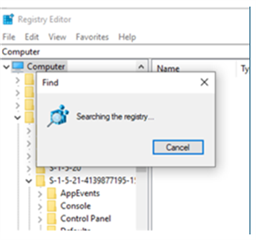
When the registry key appears, right-click on it and select 'rename'.
Add 'old' to the end of the LDSRClient5 name.
Close the registry.
Open Studio and you should find that it prompts you to add your 5 languages again. Note that you don't need to add more than one variant of any language as all other variants of that language will work once it has been added.
Only do this if you feel confident enough to change your PC registry. If not, contact installation support here:
Fill out the form, tick 'Installation' on the Case Type dropdown menu, explain your problem, quote this post as they may not know how to do the above, and give them an accurate email address to contact you on and they can access your computer to change that setting for you.
All the best,
Ali

Thank you so much for this solution. It worked immediately. After spending 4 hours uninstalling, installing, working with the SDL Freshstart app, this finally worked to let me change the languages. I only have to say how frustrating it is at times like these to work with Trados and these "quirks" that keep you running around in circles until you finally find the ONE person who can provide assistance.
The solutions are these, with only one new solution on the horizon:
Paul Filkin | RWS
Design your own training!
You've done the courses and still need to go a little further, or still not clear?
Tell us what you need in our Community Solutions Hub

Hi Maarja Ora
I hope this is OK with you Paul Filkin
Addition to item 2...
If you're unsure of this process, you can contact installation help here:
installation and licensing help
Select 'Installation' from the 'Case type' dropdown menu and refer them to this thread to show what you have already discussed here. They can do the fix for you remotely via the internet.
Someone will help in the next day or two. Make sure you give your correct email address as this is how they will contact you.
All the best,
It's ok with me, but this doesn't really qualify as a support case for non-supported customers since there isn't a problem to fix. So support may decline to help.
Paul Filkin | RWS
Design your own training!
You've done the courses and still need to go a little further, or still not clear?
Tell us what you need in our Community Solutions Hub

Hi Alison,
Thank you. Somebody from the support staff already contacted me this morning. Let's see if they can help me.
Another possibility would be to return the licence and then reinstall the programme, I guess.
Hi Maarja Ora
As Paul Filkin said in item 1., you'd have to remove every trace of the installation, which would include removing leftover entries from the registry. On older versions reinstalling would reset the languages but this isn't the case with Studio 2019.
Ali 
Hi Alison,
A support person changed the registry, it took them a minute. However, the day after tomorrow I must change the languages again and must do it on my own. Somehow. I cannot Ask them every other day to do it for me.
Hi Maarja Ora
Hopefully seeing how quick and easy it is will give you the courage to do it yourself next time.
You can always make a back-up of the registry first before you do it, if you're feeling unsure.
At least you won't have to worry when Studio 2021 comes out.
All the best,
Ali
You're very welcome!
I hope you'll enjoy Studio 2021 as much as I do (I'm already using it, as a beta tester)
All the best,
Ali
Hi Alison,
I had to change the languages once again and adding "old" to the registry key you mentioned worked.
Today I had to change it again but search doesn't even find the key. I tried to reset the computer to an earlier date. Nothing works... What should I do now? The deadline is approaching and I cannot even start translating my file.
Hi Alison,
I had to change the languages once again and adding "old" to the registry key you mentioned worked.
Today I had to change it again but search doesn't even find the key. I tried to reset the computer to an earlier date. Nothing works... What should I do now? The deadline is approaching and I cannot even start translating my file.