Add Term Takes Forever

When I add a term now in Trados 2017, I have to stop and watch the termbase slowly load the whole list of terms on the left hand side of the screen. It stops my work and I wait. It's especially long the first time I do it.

I don't remember that being the case before. Have I inadvertently changed a setting? Why would this be happening?

Parents Reply
  • Hi Joseph,

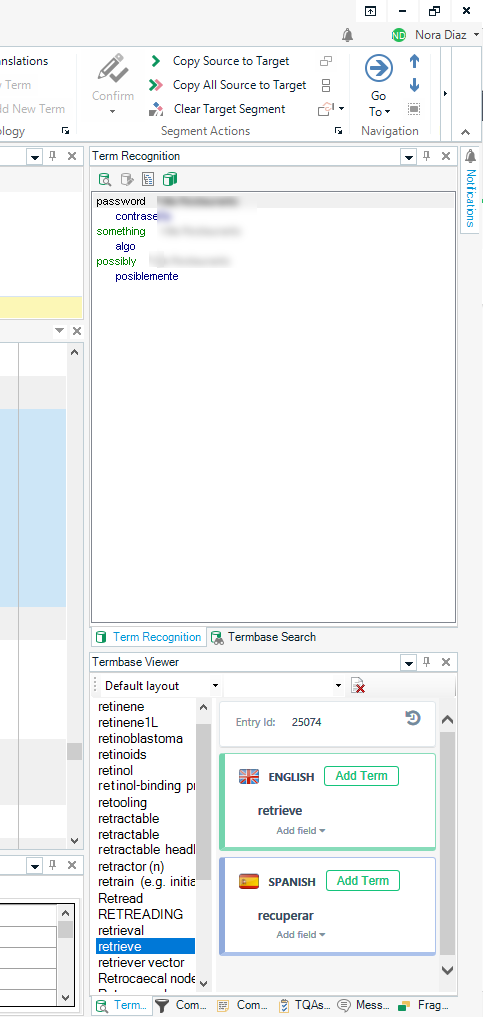
    The Termbase Viewer will refresh the term list several times until it finds the right location for the new term. If you have a very large termbase and your Termbase Viewer is in the default location and not docked but rather appears on screen every time you add a new term and hides after the term is added, if you're adding a term that begins with an "s", for instance, and your termbase has several thousand entries, this can take a couple of seconds (or maybe a second, but it feels like forever, I agree). I find that two things seem to help move things along. First, docking the Termbase Viewer, as Paul has suggested, and second, placing it so it won't take up the entire height of the program interface, but maybe only half or one third (I keep it docked on the lower right as shown below). Somehow this seems to make the refreshing go faster.

Children