The Trados cloud platform will be undergoing maintenance on Saturday, 9th May 2026 between 05:00 to 17:00 UTC. During this time, you will not be able to log in to the Trados platform.

Multiple formatting tags appearing in the text in Studio 2017

Hi,
We have started cleaning-up InDesign files for translation (extracting IDMLs) for a new customer.
We are following all standard file check-up and fix steps as usual but for the first time we get complaints from the requester that they see multiple formatting tags in our files.
This customer works with Studio 2017 like many other clients of ours who have never come to us with similar queries.
The tags appear even right in the middle of the words, like in the screenshot below:
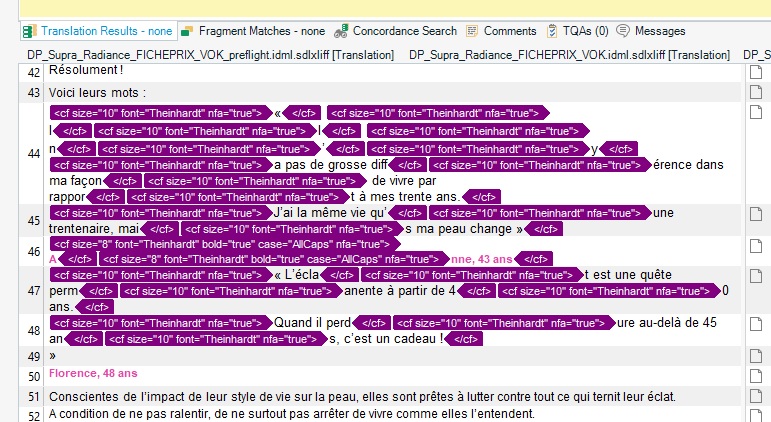


Could anyone please help with any ideas of the possible cause of this? We would greatly appreciate any help!

Thank you!

Zlatka

  • Hi  

    I have also run across many of these tags in IDML files (i.e. the tags with "nfa=true")

    When I translate I always follow the corresponding PDF, so I generally ignore these tags or combine them unless there are formatting changes like bold or italic or a different font.

    If they appear to be there just to make the lines justify or break nicely, then they are not needed. The spacing needed to justify or break the lines in the translation will be completely different anyway.

    So in the example you provided, since the tags all include the same font name and size, when translating I would probably just use one tag pair to format all of the text in each segment (unless there was a section of bold or italic text in the PDF), instead of trying to figure out where to place each and every one of the tags.

    I might be wrong in my interpretation of these tags as being mainly for spacing, but no clients have complained yet :-)

    Best regards,
    Bruce Campbell
    ASAP Language Services

  • Hi Bruce Campbell,

    Thank you for sharing your experience with the inline formatting tags in Studio 2017.

    We have reviewed the allegedly "faulty" IDML files in detail and there is nothing like hidden characters, spacing issues, kerning, tracking, soft returns or anything else that could cause problems in translation so we believe they can safely be translated.

    Nevertheless, there is a potential new client who claim that they cannot work with the formatting tags and since we are unable to find a solution how to remove them at this stage, I guess it is a Catch-22 :-).

    Hopefully, the SDL Team some up with a solution for this bug in the near future.

    Best regards,
    Zlatka
  • That thread is somewhat old, but the issue is still relevant today, and not only for IDML files. Actually, it is not really an issue, since it does not prevent to translate or re-export the document. It just make the translation more complex, since it is visually a mess. 


    IMHO, the issue comes from the initial document. For instance, when the author, writes a sentence in the default color, which is usually black, and nevertheless specify black for some words in it, you will get useless black formatting tags in your sdlxliff, because those formatting tags are already in the source document. It is the same if you put some word in bold, then decide later to put also in bold the next following word, you will get two pairs of bold tags instead of one. and so on. That happens often when a documents had several revisions. 

    As Bruce suggested, you can consolidate the pairs of tags. For instance, if you have multiple Arial 10 pairs, you can remove them and only put an opening Arial 10 tag at the beginning of the sentence and a closing tag at the end.

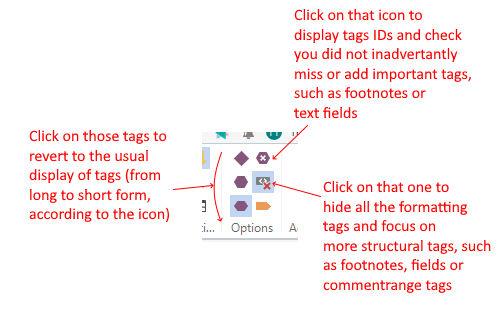
    Also, there are features really handy to improve the visibility of a segment with many tags in the ribbon:
    Screenshot showing icons in Trados Studio ribbon to toggle tag display modes, with annotations explaining their functions.
    You can see below a view where I streamlined the formatting tags:

    Screenshot of a segment in Trados Studio with detailed formatting tags visible, including font, size, and bookmark IDs.

    Now, a view of the same where formatting tags are hidden (but still there — actually, the text is wysiwyg):

    Screenshot of a segment in Trados Studio with formatting tags streamlined for better readability.

    And now a view with just tags IDs, which allows to focus on the translation as such and easily check you did not omit or add important tags:

    Screenshot of a segment in Trados Studio with tag IDs displayed instead of full formatting tags for easier focus on translation.

    Of course, you can use several combinations of those views. It really facilitates and accelerates the process with tagfull segments.

    HTH

    emoji


    Generated Image Alt-Text
    [edited by: RWS Community AI at 3:09 PM (GMT 0) on 20 Nov 2025]