Trados 2017 auto-propagation doesn't work properly

I have been using Trados 2015 freelance and upgraded to 2017 a few days ago, and I really regretted it. I didn't know I should not have deactivated 2015 before upgrading to 2017; this is not reversible and SDL refused to let me "downgrade" to 2015, but this is another story. Here I have a bigger issue. I was working on a file with approx. 4K segments, with supposedly many 100% and CMs which could be auto-propagated in 2015, i.e. I only had to work on first occurrences and Trados could deal with the 100%/repetitions. However, 2017 didn't auto-propagate those; instead, the match values were below 100% and I had to confirm every single segment, which was really time-consuming. Here's the comparison:

Trados 2017/2015 auto-propagation comparison


I have made sure all the settings are identical in the global options and project settings of both Trados 2015 and 2017. Can anyone help please? Many thanks.


Regards,

Peggy

Parents
  • Hi  

    I was thinking about your situation a little so I took your source file out of the projects you sent me and tranlsated it again from scratch with a new TM in Studio 2015, 2017 and 2019 to see if I could at least reproduce what you have posted.  I think the TMs you sent me didn't help because they were already populated which is why I had the result I did.

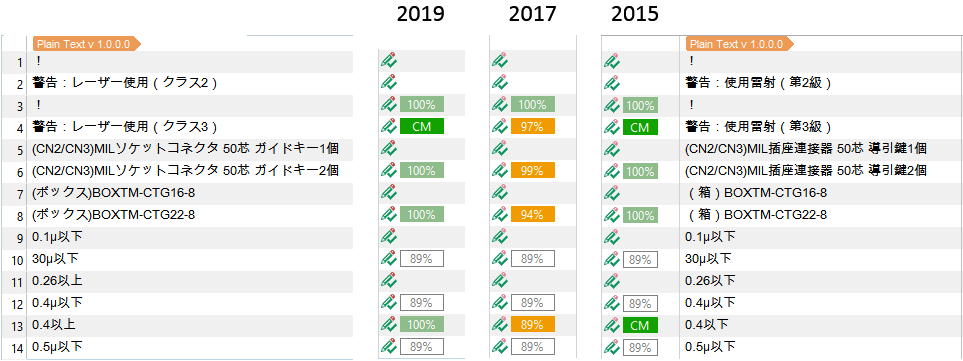
    This time I get these:

    Screenshot comparison of Trados Studio 2019, 2017, and 2015 showing translation match percentages. 2019 and 2015 have consistent 100% matches, while 2017 shows a decrease in match quality with a warning symbol.

    So I can reproduce the problem you are having in 2017, and I've also verified it's been fixed in 2019 which is good.  I don't believe there is a workaround to this problem in 2017 as it is going to require a fix from development.  I'll drop you an email on what we do to help you here.

    Regards

    Paul

    Paul Filkin | RWS

    Design your own training!
    You've done the courses and still need to go a little further, or still not clear? 
    Tell us what you need in our Community Solutions Hub

    emoji


    Generated Image Alt-Text
    [edited by: Trados AI at 1:43 PM (GMT 0) on 28 Feb 2024]
Reply
  • Hi  

    I was thinking about your situation a little so I took your source file out of the projects you sent me and tranlsated it again from scratch with a new TM in Studio 2015, 2017 and 2019 to see if I could at least reproduce what you have posted.  I think the TMs you sent me didn't help because they were already populated which is why I had the result I did.

    This time I get these:

    Screenshot comparison of Trados Studio 2019, 2017, and 2015 showing translation match percentages. 2019 and 2015 have consistent 100% matches, while 2017 shows a decrease in match quality with a warning symbol.

    So I can reproduce the problem you are having in 2017, and I've also verified it's been fixed in 2019 which is good.  I don't believe there is a workaround to this problem in 2017 as it is going to require a fix from development.  I'll drop you an email on what we do to help you here.

    Regards

    Paul

    Paul Filkin | RWS

    Design your own training!
    You've done the courses and still need to go a little further, or still not clear? 
    Tell us what you need in our Community Solutions Hub

    emoji


    Generated Image Alt-Text
    [edited by: Trados AI at 1:43 PM (GMT 0) on 28 Feb 2024]
Children
No Data