


ファイルを開く際のエラー「依存関係ファイルが見つかりません」→訳文が生成できない

いつもお世話になっております。

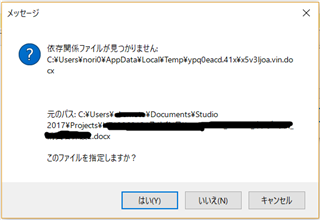
度々おこる問題なのですが、お客様から送られてきたパッケージを開き、初めは全く問題なく、ある時点まで通常通り作業を進めていくと、ある日突然、ファイルを開く際に下記のメッセージが表示されるようになります。黒く消したところは、お客様の名前とお客様がパッケージ作成時に命名したファイル名ですが、要求されている依存関係ファイルとは全く別の名前です。
Error message in Trados Studio asking if the user wants to locate a missing dependency file with options to browse, skip, or cancel.

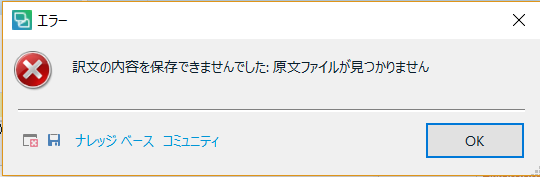
パッケージを読み込んだときに生成されるフォルダ内の「ja-JP」というフォルダに、元のパスと同名の「edit_XXXXXX.docx」というファイルがあるので、このファイルを指定すると開け、作業を続けることができ、さらに返却ファイルを生成することも可能です。また、指定せず「キャンセル」を選んでも同様です。ところが、訳文の生成ができなくなるのです。訳文生成時に表示されるエラーは次の通りです。
Error message in Trados Studio stating that the translation results could not be generated because the dependency file is missing.

同じ現象が何度も起こっており、通常このプロジェクトだけのTBを作って、パッケージを読み込み直しプロジェクトを新たに作成して、それまで作業した分をTBから一括訳文生成で読み込んで対応していますが、100%マッチ=旧ファイルと全く同じとは保証できないので(原文が同じでも文脈によって訳文が微妙に異なることはありえます)必ず見直しが必要です。今回、量が膨大で、見直す時間がありません。どうにかして、このまま作業を続け、訳文も生成できるようにする方法はないものでしょうか?

何卒よろしくお願いいたします。


Generated Image Alt-Text
[edited by: Trados AI at 1:51 PM (GMT 0) on 28 Feb 2024]
emoji
Parents Reply
  • Hello Noriko Koyama (NorikoKoyama) 

    The error

    Unknown said:
    "Cannot find central directory".

    would I believe indicate that the SDLXLIFF is in itself corrupt.

    In which case you would need to recreate the SDLXLIFF  and use the "Perfect Match" or "Pre-translate" tasks in order to re-translate the file and generate a target document.

    a. Open the original source file in Studio (use the same segmentation rules that you used in your project/corrupt sdlxliff)
    b. Use the Batch Task -> Apply Perfect Match and point to the corrupt sdlxliff file. The statuses of the segments will show as PM
    c. If b. does not work, then start over and user your TM to pre-translate.

    If the TM is not available, then create a new, empty TM and import the corrupt sdlxliff in it, and use that to pre-translate.


    Please let me know if this helps.


    Oana Nagy | Developer Experience | QA Engineer | RWS Group

Children