 Translate



Although the box appears in miniature size after clicking on it, it will not open and I cannot type anything in or search my text. How can I fix this?

RWS Community
Although the box appears in miniature size after clicking on it, it will not open and I cannot type anything in or search my text. How can I fix this?
Hello Jutta Kuhn ,
Is it possible that you have been working with two screens?
Are you able to see the 'Search and Replace' window in the task bar?
If so, then take a look at the following article-
If you still have problems, please post screen shots into the community to give us a better idea of the issue.
Oana Nagy | QA Engineer | RWS Group

I have the same problem with Studio 2021 and I am working with 2 screens. The tips under the link don't work for my problem. Many thanks in advance for your help!

Can you see the Find and Replace window in the task bar?
Something like this:


a lot of thanks for your answer. yes, I can see the Find and Replace window in the task bar, but the window is complete white, in the background of the normal sdl trados windows. When I touch it, it despairs. Can you see my screen shot I sent in a word file?
No, we can't see the link to your document. Maybe you need to zip the Word document and then insert the ZIP here (Insert > Image/Video file). Alternatively, you can drag & drop or even paste the image itself…
Anyway, if the window is in the task bar, you can easily find it cascading the windows (right-click in the task bar, hen select Cascade windows):
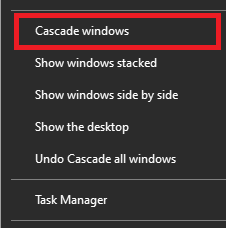
Is this what you did?
I nothing works, try View ribbon > Reset window layout button in Trados. It may help…

No, we can't see the link to your document. Maybe you need to zip the Word document and then insert the ZIP here (Insert > Image/Video file). Alternatively, you can drag & drop or even paste the image itself…
Anyway, if the window is in the task bar, you can easily find it cascading the windows (right-click in the task bar, hen select Cascade windows):
Is this what you did?
I nothing works, try View ribbon > Reset window layout button in Trados. It may help…
I tried Cascade Windows too, the window did not appear, and I tried Reset window layout - nothings happens. In the image we can see the white Find and Replace Window, it does not remain open.
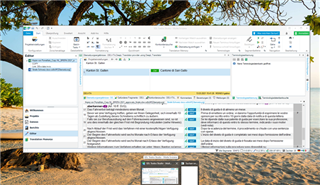
OK, I can see your empty Find dialog box.
My Find dialog box is not empty:
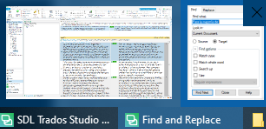
Did you try pressing ALT+TAB or WIN+TAB keys in order to bring the Find and Replace window up (to the top of the windows stack)?
I think it should…
Anyway, your issue is the same as this posted here with the solution:
Does it work for you?

