Auto propagation

Hello,

I'm quite new at using SDL trados.... I pre translated a one-file project (in which the same sentences/numbers are repeated many times: fiscal form) after pre traslating it there were plenty of fuzzy matches...how can I automatically apply the right translation (with ref. to the repeated sentences) to all document once I manually translated them once?

Thanks for yr help!


Anna

PS what is the main difference between pre translation and simulate translation?

Parents
  • Hello  ,


    When you 'pre-translate' your files, you will be doing this via the Batch Tasks option and based on the default (enabled) options and your Translation Memory (TM) which you can rely on as being correct as you have previously confirmed and saved the translated segments.

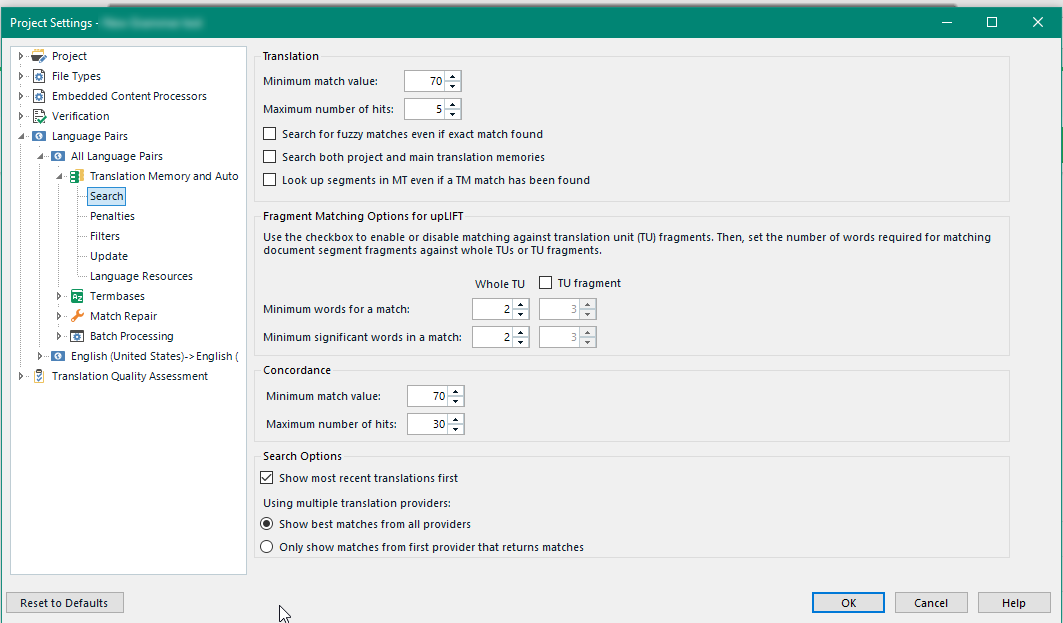
    Fuzzy matches of course will also be populated from the TM - but wont be 100% (see default setting below) allowing you to simply edit the segment and then add this to your TM.

    If you presented with multiple options in the 'translation results window'- you need to select the one that you prefer.

    Trados Studio Project Settings window showing Translation Match values and options for Batch Tasks pre-translation.


    When you mention 'simulate translation' are you referring to Machine Translation or the 'pseudo translation (under Batch Tasks)?

    Pseudo-translation is a procedure which simulates how a translated document will look after translation and how much extra DTP or other work will be required before actual translation is done. Pseudo-Translation will not provide you with a workable target translation.

    'Machine Translation' are real translations, originating from an online translation server (e.g. Google or SDL Language Cloud) but will need editing by you before you save these to your own TM. 

    Maybe take a look at the following video-its about 15 minutes long, but covers most aspects about translating a document/auto-propogation/autosuggest ....

    www.youtube.com/watch

    Should you have further questions please do ask here in the community.


    Oana Nagy | Developer Experience | QA Engineer | RWS Group

    emoji


    Generated Image Alt-Text
    [edited by: Trados AI at 2:15 PM (GMT 0) on 28 Feb 2024]
Reply
  • Hello  ,


    When you 'pre-translate' your files, you will be doing this via the Batch Tasks option and based on the default (enabled) options and your Translation Memory (TM) which you can rely on as being correct as you have previously confirmed and saved the translated segments.

    Fuzzy matches of course will also be populated from the TM - but wont be 100% (see default setting below) allowing you to simply edit the segment and then add this to your TM.

    If you presented with multiple options in the 'translation results window'- you need to select the one that you prefer.

    Trados Studio Project Settings window showing Translation Match values and options for Batch Tasks pre-translation.


    When you mention 'simulate translation' are you referring to Machine Translation or the 'pseudo translation (under Batch Tasks)?

    Pseudo-translation is a procedure which simulates how a translated document will look after translation and how much extra DTP or other work will be required before actual translation is done. Pseudo-Translation will not provide you with a workable target translation.

    'Machine Translation' are real translations, originating from an online translation server (e.g. Google or SDL Language Cloud) but will need editing by you before you save these to your own TM. 

    Maybe take a look at the following video-its about 15 minutes long, but covers most aspects about translating a document/auto-propogation/autosuggest ....

    www.youtube.com/watch

    Should you have further questions please do ask here in the community.


    Oana Nagy | Developer Experience | QA Engineer | RWS Group

    emoji


    Generated Image Alt-Text
    [edited by: Trados AI at 2:15 PM (GMT 0) on 28 Feb 2024]
Children