Automated Translation

 Hi!

I don't recall this ever happening before. I am translating a financial report which frequently has figures in the format (example) "2.576,00 €". This is automatically ("AT" is shown next to the translated segment) translated in the source window in exactly this format, i.e. "2.576,00 €; the full stop and comma are not reversed (the position of the € is irrelevant for me; I can change that easily enough). I have tried deleting the €, but it still automatically enters the translation "2.576,00 €". Other numbers are substituted correctly, so it must have something to do with the € being placed here.

I do not have any kind of automated translation selected in the settings, only the local TMs on my computer.

As I don't remember this ever happening before, I wonder if there is something crazy about the original Word file, especially since I keep getting messages that the bilingual file cannot be saved (close the file, re-open it, the translations since the last save are entered from the TM, then I can save it). But there is nothing I can see there that would help me.

Thank you!

Michael Medlinger

  • Hi

    I tried to reproduce this problem and can't. I tried to "force" Studio to handle this incorrectly and can't either. So the only conclusion I can come to at the moment is this:

    1. You are using a language pair that behaves this way (I used de(DE) to en(GB)), or
    2. your regional settings in Windows are set up differently for the language pair you are using

    The AT status refers to "Automated Translation" as in Studio has been able to translate the TU for you. This could be, for example, automatic translation of numbers based on your settings, or it could be a macine translation engine. Confusingly we don't distinguish between the type of AT.

    If you are able to share your TM I'd be happy to see if I can reproduce the issue using your resources?

    Paul Filkin | RWS Group

    ________________________
    Design your own training!

    You've done the courses and still need to go a little further, or still not clear? 
    Tell us what you need in our Community Solutions Hub

  • Screenshot of Trados Studio segment showing '1.994.263,00  ' underlined in blue indicating it's treated as a single unit.

    Hi, Paul,

    Thanks for the reply.

    Here is a snapshot of one of the segments. You can see (I hope) that the "1.994.263,00 €" is treated as a unit and is underlined in blue. The date is as well, but whereas the date is auto-substituted, this unit is taken over "as is". (The figure in the target segment is my correction. I tried to show the "placeables" (is that the right term for this?) it offered, but that window disappeared every time I used the snipping tool.)

    It looks like an auto-substitution, but I have no idea where this might come from. I have looked through all the settings I can imagine in Studio, the TM, and even Windows, but can't find where this might come from. Trados seems to treat it like a non-variable element.

    I really don't remember ever having this problem before, but that is possibly because no one has ever used the format "x.xxx.xxx,xx €" before.

    Does this help at all? I'm not going to worry about it too much, as it does not seem to be a problem that occurs regularly. Thank you in any case!

    Michael Medlinger

    emoji


    Generated Image Alt-Text
    [edited by: Trados AI at 2:24 PM (GMT 0) on 28 Feb 2024]
  • Hi  

    I recorded a quick video to show that with a clean TM there should be no problem with the results:

    The error messages I got (just noticed them) are just due to some silly QA settings I put in when I was testing something else and forgot to take out... they are at least correct ;-)

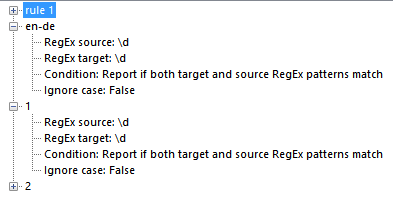
    Screenshot of Trados Studio showing QA checker rules with RegEx patterns for source and target text, indicating a condition to report if both match, with ignore case set to false.

    I think the only way we can get to the bottom of your issue would be to have a copy of your TM because I think it's related to your content.  You could also test my file and see what you get with your TM doing the same thing:

    numbers.docx_de-DE_en-GB.zip

    Paul Filkin | RWS Group

    ________________________
    Design your own training!

    You've done the courses and still need to go a little further, or still not clear? 
    Tell us what you need in our Community Solutions Hub

    emoji


    Generated Image Alt-Text
    [edited by: Trados AI at 2:24 PM (GMT 0) on 28 Feb 2024]
  • Hi, Paul!
    Thanks for your efforts. I believe I have found the problem. In the settings for the one TM (which is huge, which rather precluded sending it, anyway), the option "Recognize alphanumeric strings" had been disabled. I enabled it, and now the numbers with the "€" are recognized and substituted the way they should be.
    Thanks again!
    Michael Medlinger