The Trados cloud platform will be undergoing maintenance on Saturday, 9th May 2026 between 05:00 to 17:00 UTC. During this time, you will not be able to log in to the Trados platform.

Studio not recognizing "seconds" as a unit?

I have a list with hundreds of time values in seconds (benchmarking stuff). Here's a part of it:
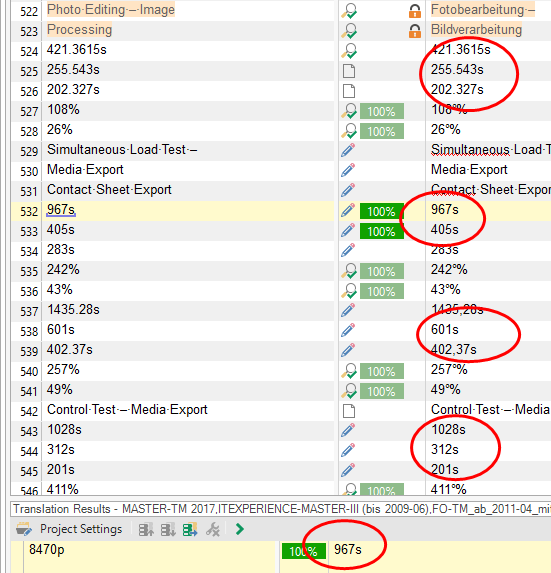
Screenshot of Trados Studio showing a list of time values in seconds with some values circled in red, indicating an issue with auto-substitution settings.

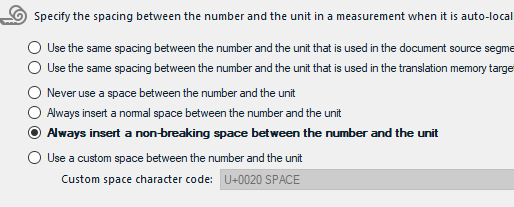
The auto-substitution is set to:

Screenshot of Trados Studio auto-substitution settings with the option 'Always insert a non-breaking space between the number and the unit' selected.

But this setting is ignored by Studio (applies for 2017 and 2019).

Obviously "s" (for seconds) is not recognized by Studio as being a "unit". This is quite disappointing. I cannot even use auto-propagation and need to manually edit each single segment.

Is there no way to tell Studio that "s" is a "unit"?


Generated Image Alt-Text
[edited by: Trados AI at 2:26 PM (GMT 0) on 28 Feb 2024]

emoji
Parents
  • Hi

    I think there are a couple of things here. First of all there should always be a space between the number and a unit when writing seconds, but if you do this you'll see that Studio fails to recognise this as a valid number and unit anyway so number recognition fails there.

    Second thing is that in your incorrectly written source Studio does actually seen to recognise the number and unit because the number and the unit is underlined as you can see in segment #532. However, it is not paying any attention to the auto-substitution rules so you can't put a space in there. I think this is most likely because the recognition is actually as an alpha-numeric and not as a number and unit.

    On this basis the bug is that seconds are not correctly recognised as a unit of measurement for numbers since it's behaving correctly otherwise. Auto-propagation will work however, but you get all the target numbers without a space. So at least you can work with this since you can now easily search and replace the project for numbers and seconds and insert the space using regex.

    Not ideal I know, but at least you have a workaround until the development team fix Studio to properly handle numbers and units. I can tell you that Studio fails with these:

    3 s
    4 s
    7 cd
    8 m2
    9 m3
    10 m/s
    11 m/s2
    12 m-1
    13 kg/m3
    14 m3/kg
    15 A/m2
    16 A/m
    17 mol/m3
    18 cd/m2
    19 rad
    20 sr
    23 Pa
    26 C
    28 F
    29 Ω
    30 S
    31 Wb
    32 T
    33 H
    35 lm
    36 lx
    37 Bq
    38 Gy
    39 Sv
    40 kat
    41 Pa s
    42 N m
    43 N/m
    44 rad/s
    45 rad/s2
    46 W/m2
    47 J/K
    48 J/(kg K)
    49 J/kg
    50 W/(m K)
    51 J/m3
    52 V/m
    53 C/m3
    54 C/m2
    55 F/m
    56 H/m
    57 J/mol
    58 J/(mol K)
    59 C/kg
    60 Gy/s
    61 W/sr
    62 W/(m2 sr)
    63 kat/m3
    65 h
    66 d
    68 '
    69 "
    71 L
    73 Np
    75 dB
    76 eV
    77 u
    78 ua

    and succeeds with these:

    1 m
    2 kg
    5 K
    6 mol
    21 Hz
    22 N
    24 J
    25 W
    27 V
    34 °C
    64 min
    67 °
    70 l
    72 t
    74 B

    I took these from the SI units and have tested them with every release since 2009. There have been some changes... unfortunately for the worse... but the workaround is to allow Studio to do its thing and then search and replace afterwards to make the corrections since the most important thing is to get the number right in the translation.

    Paul Filkin | RWS

    Design your own training!
    You've done the courses and still need to go a little further, or still not clear? 
    Tell us what you need in our Community Solutions Hub

Reply
  • Hi

    I think there are a couple of things here. First of all there should always be a space between the number and a unit when writing seconds, but if you do this you'll see that Studio fails to recognise this as a valid number and unit anyway so number recognition fails there.

    Second thing is that in your incorrectly written source Studio does actually seen to recognise the number and unit because the number and the unit is underlined as you can see in segment #532. However, it is not paying any attention to the auto-substitution rules so you can't put a space in there. I think this is most likely because the recognition is actually as an alpha-numeric and not as a number and unit.

    On this basis the bug is that seconds are not correctly recognised as a unit of measurement for numbers since it's behaving correctly otherwise. Auto-propagation will work however, but you get all the target numbers without a space. So at least you can work with this since you can now easily search and replace the project for numbers and seconds and insert the space using regex.

    Not ideal I know, but at least you have a workaround until the development team fix Studio to properly handle numbers and units. I can tell you that Studio fails with these:

    3 s
    4 s
    7 cd
    8 m2
    9 m3
    10 m/s
    11 m/s2
    12 m-1
    13 kg/m3
    14 m3/kg
    15 A/m2
    16 A/m
    17 mol/m3
    18 cd/m2
    19 rad
    20 sr
    23 Pa
    26 C
    28 F
    29 Ω
    30 S
    31 Wb
    32 T
    33 H
    35 lm
    36 lx
    37 Bq
    38 Gy
    39 Sv
    40 kat
    41 Pa s
    42 N m
    43 N/m
    44 rad/s
    45 rad/s2
    46 W/m2
    47 J/K
    48 J/(kg K)
    49 J/kg
    50 W/(m K)
    51 J/m3
    52 V/m
    53 C/m3
    54 C/m2
    55 F/m
    56 H/m
    57 J/mol
    58 J/(mol K)
    59 C/kg
    60 Gy/s
    61 W/sr
    62 W/(m2 sr)
    63 kat/m3
    65 h
    66 d
    68 '
    69 "
    71 L
    73 Np
    75 dB
    76 eV
    77 u
    78 ua

    and succeeds with these:

    1 m
    2 kg
    5 K
    6 mol
    21 Hz
    22 N
    24 J
    25 W
    27 V
    34 °C
    64 min
    67 °
    70 l
    72 t
    74 B

    I took these from the SI units and have tested them with every release since 2009. There have been some changes... unfortunately for the worse... but the workaround is to allow Studio to do its thing and then search and replace afterwards to make the corrections since the most important thing is to get the number right in the translation.

    Paul Filkin | RWS

    Design your own training!
    You've done the courses and still need to go a little further, or still not clear? 
    Tell us what you need in our Community Solutions Hub

Children
No Data