 Translate



Hi all
I presume it's real easy, but I can't figure out how to get it done. How can I delete these tasks to clean up the"Sent Tasks" folder?
Thanks very much.
David
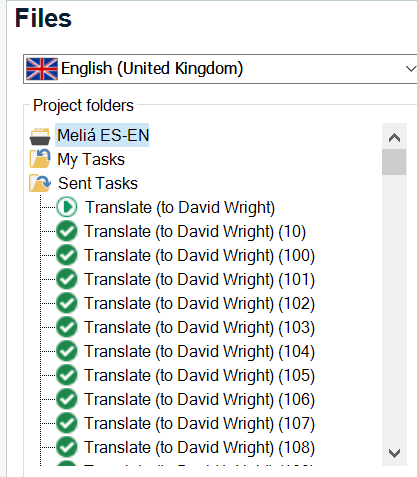
Generated Image Alt-Text
[edited by: Trados AI at 6:31 PM (GMT 0) on 28 Feb 2024]


Hi all
I presume it's real easy, but I can't figure out how to get it done. How can I delete these tasks to clean up the"Sent Tasks" folder?
Thanks very much.
David
Hello David Wright ,
The easiest way to do this, is to select your client folder (in this case Melia) then right click the file and delete-
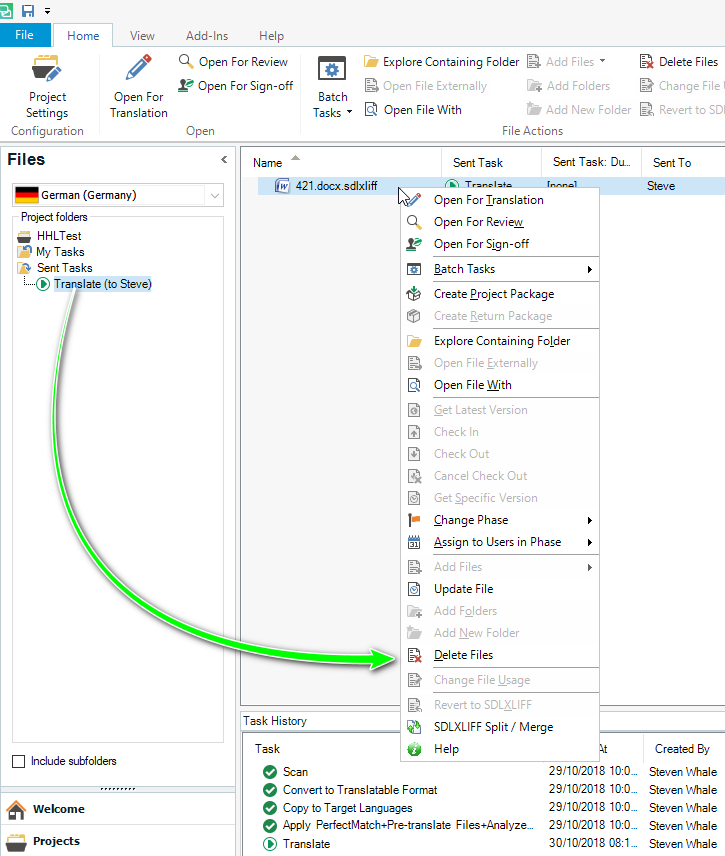
You will then receive a warning that by continuing the action, the files will be permanently deleted from the disk-
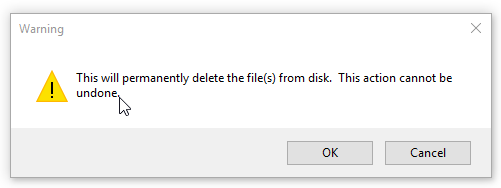
However, this only removes the files from Studio and will not delete them from your 'project folder'.
Oana Nagy | QA Engineer | RWS Group


Paul Filkin | RWS
Design your own training!
You've done the courses and still need to go a little further, or still not clear?
Tell us what you need in our Community Solutions Hub
My guess: David is re-using the same project over and over for various, even unrelated, files. That's the only way I can think of which would cause such situation.
I've heard of (and even seen) people behaving this way - e.g. using a single huuuge Word file for many unrelated documents/letters/etc... each simply starting on a new page (using a series of linebreaks, NOT a simple pagebreak, of course...) :-O
