 Translate



Hi everyone, I want to merge my TM to the client's TM he sent me as a reference. The goal would be to have ONE TM that he could use in the future.
Can anyone explain to me how to do it?
Thank you!

Hi everyone, I want to merge my TM to the client's TM he sent me as a reference. The goal would be to have ONE TM that he could use in the future.
Can anyone explain to me how to do it?
Thank you!

Hello colleagues! I'm having the same problem. I tried to follow your instructions here but I find myself in a Kafkian situation: to merge TMs everything starts from the "Upgrade Translation Memory" button, which however is no longer provided in SDL TRADOS 2021 version. So, how are we supposed to merge two or more TMs into one?
Please, help!!
Valeria
You need to install this app:
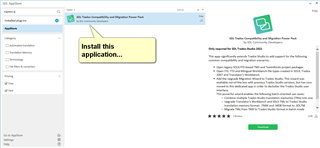
All explained in here:
https://multifarious.filkin.com/2020/08/15/some-you-win-some-you-lose/
Paul Filkin | RWS
Design your own training!
You've done the courses and still need to go a little further, or still not clear?
Tell us what you need in our Community Solutions Hub

You need to install this app:
All explained in here:
https://multifarious.filkin.com/2020/08/15/some-you-win-some-you-lose/
Paul Filkin | RWS
Design your own training!
You've done the courses and still need to go a little further, or still not clear?
Tell us what you need in our Community Solutions Hub

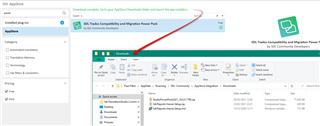
Thanks Paul, at last, not without difficulty, I found everything. The packages to be unzipped could not be found anywhere, I found them only with the search button in Windows... but at last I made it!
I guess it pays to pay close attention to what it says on the screen:
Paul Filkin | RWS
Design your own training!
You've done the courses and still need to go a little further, or still not clear?
Tell us what you need in our Community Solutions Hub

That's what I did, but the path to find the Downloads folder was not clear... anyway I eventually found it somehow. Thank you again.
Perhaps you were hiding your hidden files/folders from view in here?

Paul Filkin | RWS
Design your own training!
You've done the courses and still need to go a little further, or still not clear?
Tell us what you need in our Community Solutions Hub

No, but I was looking for the apps in Windows (C:) - AppData - Roaming... etc. and I couldn't find them there. Eventually I entered "Downloads" in the Search space in the top right corner of the normal File Explorer window and I found them! :-))