 Translate



Hi everyone, I want to merge my TM to the client's TM he sent me as a reference. The goal would be to have ONE TM that he could use in the future.
Can anyone explain to me how to do it?
Thank you!

Hi everyone, I want to merge my TM to the client's TM he sent me as a reference. The goal would be to have ONE TM that he could use in the future.
Can anyone explain to me how to do it?
Thank you!

Hello,
I have followed these steps, though I only get 1 TM at the end (as opposed to 1 TM for each language pair)... What is going wrong with this process?
You have various options in the merge process... if you only have one TM then I guess you used the merge into just one. Isn't this actually what you wanted in the first place?
Paul Filkin | RWS
Design your own training!
You've done the courses and still need to go a little further, or still not clear?
Tell us what you need in our Community Solutions Hub

I had various En>Fr and Fr>En translation memories (both UK English and US English). I chose the "Create output translation memory for each language pair", yet ended up with 1 TM (Fr>En_US). Should I not have ended up with at least one Fr>En AND one En>Fr?
(And does Studio 2019 not make the difference between UK and Us English anymore?)
Perhaps this will help get some clarification over what you are doing, and seeing. If I add 8 TMs in the flavours you menton I see this at first:
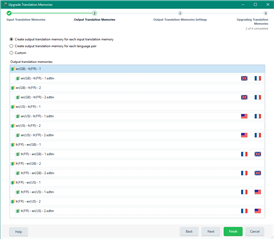
Next I choose the second option to create an output translation memory for each language pair:
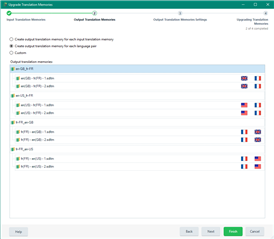
This gets me four TMs. The reason for this is because the language variants not merged, and the different language directions are not meged either. So this is what I get:
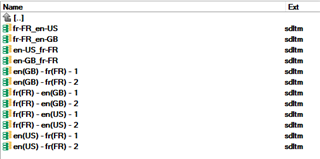
The four at the top are my new TMs.
When you do this it would be sensible to check the flags shown in the screen as these will show you what flavours you have irrespective of what flavour you might have called them.
Perhaps this will help you find your problem?
Paul Filkin | RWS
Design your own training!
You've done the courses and still need to go a little further, or still not clear?
Tell us what you need in our Community Solutions Hub

Perhaps this will help get some clarification over what you are doing, and seeing. If I add 8 TMs in the flavours you menton I see this at first:
Next I choose the second option to create an output translation memory for each language pair:
This gets me four TMs. The reason for this is because the language variants not merged, and the different language directions are not meged either. So this is what I get:
The four at the top are my new TMs.
When you do this it would be sensible to check the flags shown in the screen as these will show you what flavours you have irrespective of what flavour you might have called them.
Perhaps this will help you find your problem?
Paul Filkin | RWS
Design your own training!
You've done the courses and still need to go a little further, or still not clear?
Tell us what you need in our Community Solutions Hub
 Hi Paul,
As I explained this is basically exactly what I did, though I am only getting 1 TM (Fr>EN_US) as a result.
Trados merged all my TMs into one, so there is something very wrong here...

I have several language pairs, I have the option set to 1 TM per language pair, but somehow there is a setting (which I cannot see where to change) to make a single FR to US English output TM. What am I missing?
I can only think that you have got your TMs in all different locations and Studio has placed the merged TMs into different folders. If you can't find them try this:
1. Put a copy of all your TMs into one folder
2. Merge them
3. Identify that have the TMs you expected
4. Delete the ones you don't need.
Paul Filkin | RWS
Design your own training!
You've done the courses and still need to go a little further, or still not clear?
Tell us what you need in our Community Solutions Hub
As it gave me the option, I did have it set up to save the output TMs in a different folder (and only retrieved the 1 Fr-FR_en-US in said assigned folder). I shall try again without assigning it to a different folder and see what happens.
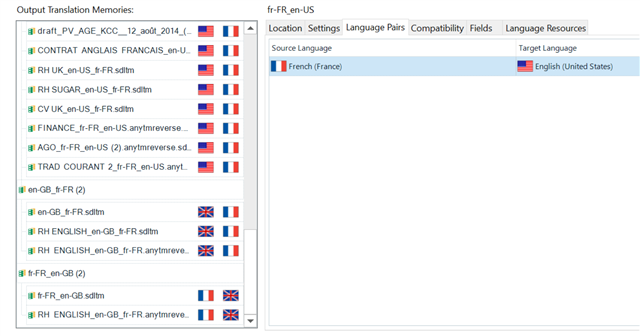
Although how do you explain the fr-FR_en-US setting in the language pairs tab (see first screen grab), when various language pairs are recognised in the output translation memories? And should this be the source of the problem as to how many output TMs I am getting, why is this set like this, and where can I change the error-causing setting?
Although how do you explain the fr-FR_en-US setting in the language pairs tab (see first screen grab), when various language pairs are recognised in the output translation memories?
Because you only selected one. These tabs allow you to edit the settings for one group at a time.
Paul Filkin | RWS
Design your own training!
You've done the courses and still need to go a little further, or still not clear?
Tell us what you need in our Community Solutions Hub
"I can only think that you have got your TMs in all different locations and Studio has placed the merged TMs into different folders." : No that is not correct, all the TMs were in the same folder and uploaded from that folder.
Although how do you explain the fr-FR_en-US setting in the language pairs tab (see first screen grab), when various language pairs are recognised in the output translation memories? > Because you only selected one. These tabs allow you to edit the settings for one group at a time.I did not select anything, it just appears this way in the tab, and there is no way that I can see to change that selection - if there is, could you kindly indicate where from?
Maybe this will help... if it doesn't please send me an email and we'll look at this together on your machine - pfilkin@sdl.com
Paul Filkin | RWS
Design your own training!
You've done the courses and still need to go a little further, or still not clear?
Tell us what you need in our Community Solutions Hub
Hi again Paul,
Thank you so much for clarifying. I have run the same thing again and this time it did give me the 4 TMs. Have a great rest of the day!
Just one more question for you - how big can a TM get before it becomes too clunky and slow to use?