Mark that shows translation provider disappears after editing instead of going transparent.

This is strange and it's never happened before.

Here is Trados working fine. I get an AT result, insert it into the segment, then edit it. So now the AT mark is transparent.

Screenshot of Trados Studio showing a segment with AT result inserted and edited, with the AT mark appearing transparent.

Here is Trados acting strange. Here is something from my translation memory. I insert it into the segment, and it looks like this:

Screenshot of Trados Studio with a translation memory result inserted into a segment, displaying a non-transparent AT mark.

But if I delete "a" or do any edits, the mark completely disappears, rather than going transparent, meaning I or a reviewer have no idea that this was from a TM hit. 

Screenshot of Trados Studio after editing a segment with a translation memory result, showing the AT mark has disappeared instead of turning transparent.

Any idea why this is happening?


Generated Image Alt-Text
[edited by: Trados AI at 8:16 PM (GMT 0) on 28 Feb 2024]
emoji
Parents
  • Hi 

    In the first image, the AT mark is semi-transparent to show that the source of the translation, the last step, was AT but it has been amended. Segments altered after insertion from AT have no percentage because that comparison does not take place.

    The second image, the last step of which was to enter a fuzzy (less than 100%) match translation from the TM, shows the percentage match the Source segment has in comparison to the Source TU in the translation memory.

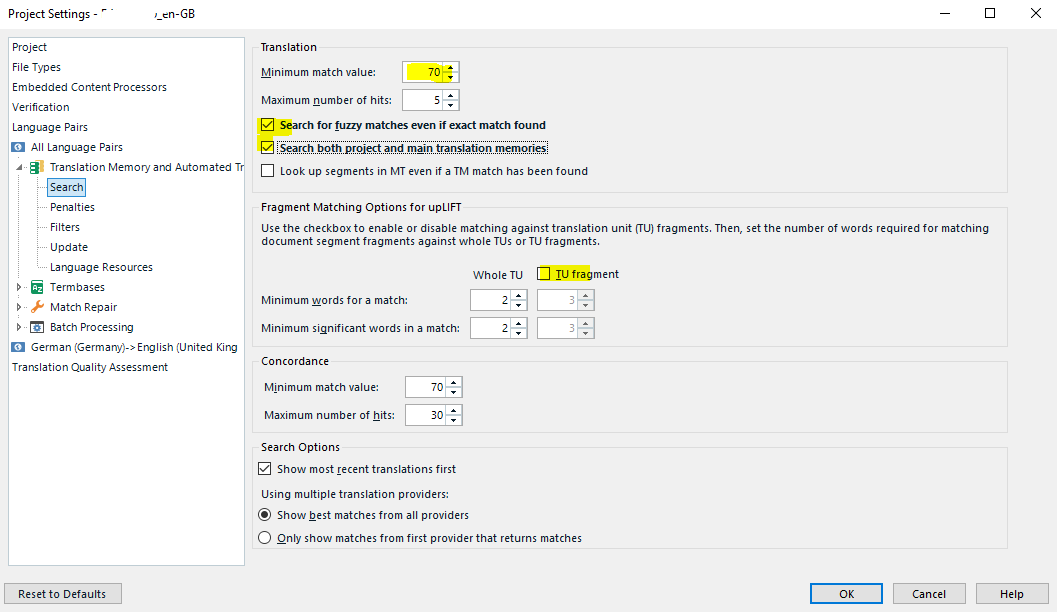
    The third image means you've gone a step further which has taken it below the minimum match value percentage set under Translation Memory Search so no direct comparison to the TM then occurs. Normally at this point, by default Fragment Matching would kick in and I think, a % match should be displayed for that, but I don't know. (As I mostly proofread/review I usually work with Fragment Matching turned off. I assume that I thus prevent the comparison percentage that would otherwise be displayed. Do you have Fragment matching turned off perhaps?)

    Screenshot of Trados Studio Project Settings showing options for minimum match value and fragment matching with two options in bold indicating non-default settings.

    I also tick the boxes of the 2 entries in bold (to show they're not default settings) I have highlighted in the above image, to show more percentage TM matches and to ensure that I'm seeing matches from both the project TM AND the main TM.

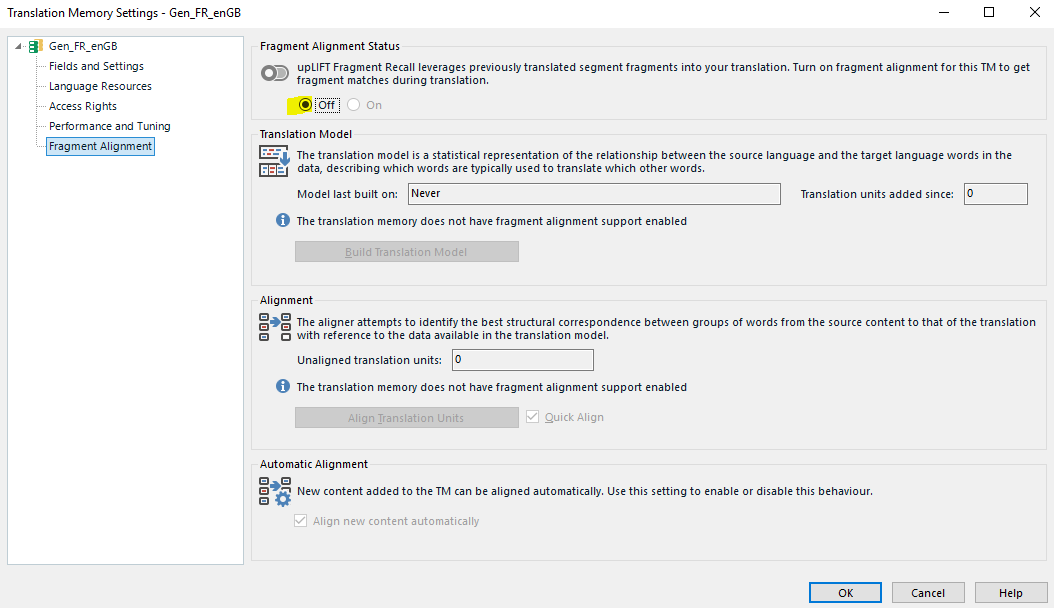
    Fragment matching may also be turned off in the TM:

    Screenshot of Trados Studio Translation Memory Settings with fragment matching options and a note on alignment quality.

    (and/or the TM may not have been upgraded...?)

    I may be wrong but, to summarize, I thought the lack of a percentage in the third image just meant that the segment's match value had gone below the percentage set for minimum match value to the TM and/or for Fragment Matching.

    All the best,

    Ali :D


    emoji


    Generated Image Alt-Text
    [edited by: Trados AI at 8:17 PM (GMT 0) on 28 Feb 2024]
  • Sorry Alison, you seem to have misunderstood my post. It's not about fragment matching or threshold settings but about the icons not appearing the way they should. An amended AT turns transparent as normally. But now an amended TM match does not go transparent. It simply disappears. This is unusual. The second and third images are of the same segment-- one before being edited and one after. Evzen above also recognized that this was unusual and suggested that I downgrade my version. I'm wondering if there's any other way to fix this icon issue rather than downgrading.
  • Hi 

    Sorry I haven't replied until now, I've been away from my computer.

    I didn't understand your post. I was suggesting scenarios that could be causing the segment match to drop to that of a 'new translation', which is represented in the central column by no icon at all.

    As  suggested, a Windows Repair may resolve this issue if it is incorrect. If not, try reinstalling and if that doesn't work contact Installation Help here

    All the best

    Ali

Reply Children
No Data