What could cause difference in total of words between languages (all Western), same project, same source file?

A project was created (in SDL Trados Studio 2017) with three source files being translated into 25 languages. Of these 25, 23 languages have a total word count of 930 words, except for two (Polish and Dutch), which have a total word count of 929.

What could explain this difference?

A new analysis (after completion of project) of the only the affected languages now show 930 words.

Any ideas?

Thanks,

Ines

Parents Reply Children
  • Hi Ines, have you been able to solve the issue? We are experiencing the same problem for the moment.

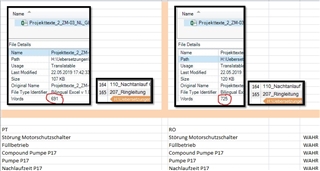
    For the same file into different languages we receive different word counts, please see the picture.

    I copied the text out of Studio to check in Excel if it could have been caused by different segmentation settings for example. But the text and the segments in both projects are absoultely identic.

    Screenshot of Trados Studio showing two project files with different word counts for the same file translated into different languages. Left file shows 591 words, right file shows 743 words.

    Best regards
    Burim

    emoji


    Generated Image Alt-Text
    [edited by: Trados AI at 11:16 PM (GMT 0) on 28 Feb 2024]
  • Word counts are a very delicate topic in the translation industry, since depending on whether you’re a corporation trying to save costs, an LSP trying to make money, or a freelance translator wishing simply to be rewarded according to the effort you put in your work, the definitions of what should be considered a word are not the same. There is no way to make a "once and for all" decision around this, as even the Unicode consortium is unsure what to decide – is an apostrophe a word divider or not?

    In view of the above differences in opinion over what should actually be taken into account, our analysis reports and word counts can be tuned according to the user’s wishes.

    As an example, users can decide to:

    1. Exclude locked segments from the word count
    2. Deduct numbers and/or placeable elements like tags
    3. Decide whether or not words that are hyphenated, joined by dashes, or words that contain formatting tags, should be counted as one or as several
    4. Decide whether elements like acronyms, alphanumeric strings etc. should be considered as ‘Recognised Token’ and therefore considered differently during word counts
    5. Display internal repetitions in the report and invoice them as 100% matches
    6. Display fuzzy matches for segments that are similar within a project, even though they haven’t yet been translated

    So instead of imposing one single way of counting the words, we offer users the choice to tune the counting algorithms according to their wishes.

    Now to get back to your question, the options 3 and 4 above are defined within your TM, and by consequence, they can be defined differently for each target language. When you see differences in word counts for the same files but across different languages, you can be sure that different boxes are ticked when you look at your individual TM settings (under Fields and Settings).

  • Thanks for the detailed response, Fleur. I'd suspected TM settings too, but could not pinpoint the exact cause for when I had this issue. I haven't seen it again, but will surely check these TM settings if it happens.

    Kind regards, Ines

  • Hello ,

    Decided to reply to you instead of opening a new topic about this issue.
    I'm having the same problem just like Ines reported. When I analyse the same source file with a different translation memory I get a different total of words.
    I checked the Settings in both TM's and they are exactly the same.

    Is there anything else I can check to settle this? I'll appreciate any possible solutions.

    Best regards, Paulo