Invalid IDML file

Hi,

I'm trying to import an IDML file in SDL Trados Studio 2019 and the following message appears. The file was created with Adobe Creative Could 2019 (the most recent update).
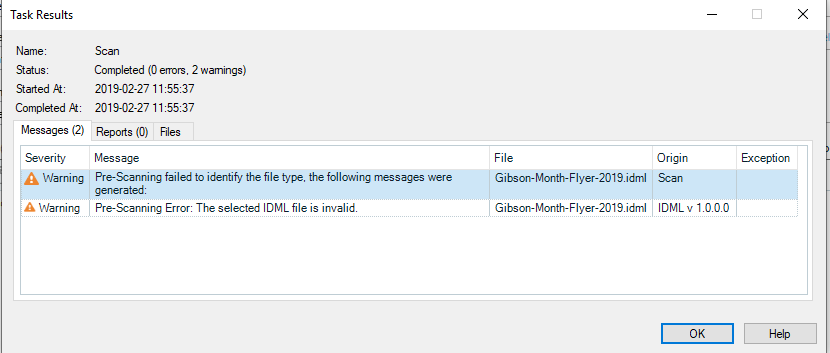
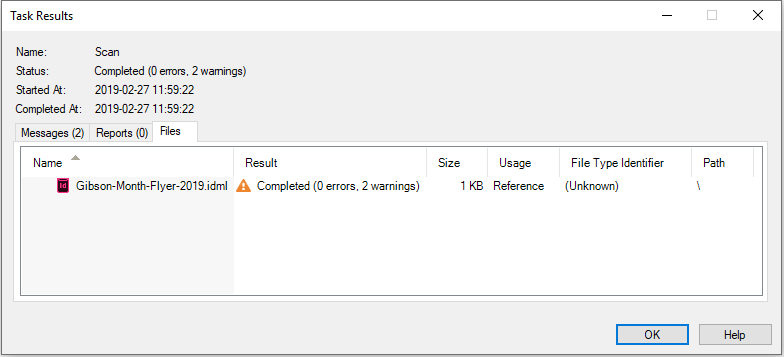
Error message in Trados Studio Task Results window showing 'Pre-Scanning failed to identify the file type. The following messages were generated' with two warnings for a file named 'Gibson-Morph-Flyer-2019.idml'.Trados Studio Task Results window showing the file 'Gibson-Morph-Flyer-2019.idml' with a status 'Completed (2 errors, 2 warnings)' and file usage set to 'Reference'.


Then I tried to change it from "Reference" to "Translatable" and it gave me this message.

Warning message in Trados Studio stating 'The file usage of 1 of the 1 selected files was not changed to translatable, because no matching file type could be found. You have to add a suitable file type via Project Settings.'


As you can see, the box for unsupported file is already checked in my project template (I did my homework!).
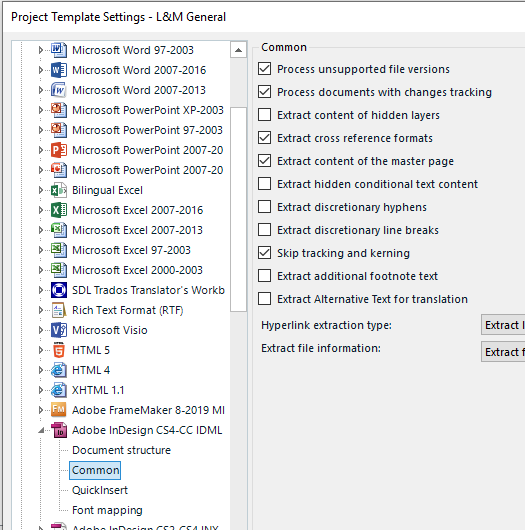
Project Template Settings in Trados Studio showing a list of supported file types with 'Adobe InDesign CS4-CC 2019 IDML' checked under the 'Common' section.


I tried taking my client's .idml version. I tried opening the file in .indd in InDesign and export it myself in .idml. I tried rebooting all the softwares and the computer. So I'm pretty much out of options! Does somebody know what could be the problem?

Thanks!


Generated Image Alt-Text
[edited by: Trados AI at 3:46 PM (GMT 0) on 28 Feb 2024]
emoji