Inconsistent fuzzy repair or my poor settings?

Hey,

My reviewer checked a translation I did and I had a couple of errors that I don't usually get. I'm sort of annoyed with myself and want to make sure it doesn't happen again for me and other members of my team. 

Screenshot of Trados Studio showing a translation segment with a repaired number and two unrepaired dimensions, highlighted with a spanner icon.

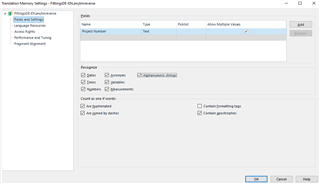
My assumption is that it's because I had just recently turned Numbers off as a variable as per the request of another translator in my team. So the top "leader" TM in my settings had this. Is this the sole cause that the other numbers didn't get fixed? I suppose this setting would affect autolocalization rather than fixing...

Screenshot of Trados Studio Translation Memory Settings dialog box with 'Numbers' unchecked under the 'Variables' section.

Or is there something lacking (that could be improved) in uplift repair? It repaired the first number, and I saw the spanner and I was just too lazy to check that the other two dimensions hadn't been repaired. I had assumed that the first dimension was good and that the others would be fixed as well.

Is there any way to avoid this problem in the future? I'm thinking about adding the numbers verify function but that adds other problems (for another post).

Thank you.


Generated Image Alt-Text
[edited by: Trados AI at 4:17 PM (GMT 0) on 28 Feb 2024]

emoji
  • Hi 

    I would say that you're right, it is because you unchecked 'Numbers' in your TM settings. Here are the settings I prefer to use:

    Screenshot of Trados Studio Translation Memory settings showing unchecked 'Numbers' option.

    The above affects if and how variables are to be recognised during translation. Then it is the 'autosubstitution' settings define that those variables are to be copied directly from source to target (via pretranslate or 'quick insert' for example). Then there are settings that define how these variables are to be localized. These autosubstitution settings can be applied project-specifically via Project settings/project template or generally via File>Options if you have the concerned language added there:

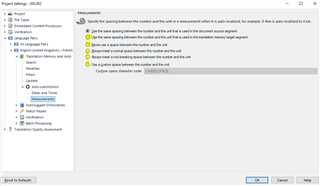
    Screenshot of Trados Studio Project Settings with 'Auto-substitution' options for dates, times, and measurements.

    There are further settings, one step below the above, to define the autosubstitution of dates and times, self-obvious, then the 3rd subentry of the 'autosubstitution' settings is Measurements, and this defines how the spacing between a number and a unit of measurement should be performed during autopropagation for example.

    An idiosyncrasy of this is that, if different from the way the first segment has been translated, these settings will overrule the spacing on all autopropagated numbers apart from those precisely the same as the first translated segment. This can be a nuisance if, for example, the first segment translated contains a number+letter combo that the software reads as a measurement when it's not. With 'always insert a space, a model number '30B' for example might autopropagate model number '20A' to '20 A' as it reads the A as an abbreviation for amps. Adding 20A to the Variables list in the TM should overrule this.

    Screenshot of Trados Studio 'Auto-substitution' settings for measurements with options for spacing between numbers and units.

    The above are just a few examples of settings that affect how variables are autosubstituted/autolocalized. Here is the section covering both in the SDL Trados Studio 2019 online help documentation:

    Auto-substitution

    The following entry in the online help covers Auto-propagation

    The following entry from the above is on upLIFT Match Repair but it has no separate variables settings.

    After reading these, feel free to come back and ask further questions here.

    All the best,

    Alison Slight smile

    emoji


    Generated Image Alt-Text
    [edited by: Trados AI at 4:17 PM (GMT 0) on 28 Feb 2024]