
Language Weaver Maintenance Activity - Saturday June 6th, 2026 between 06:00 AM UTC and 10:00 AM UTC

Converted idml file doesn't contain the whole content - Trados Studio 2019

Hello,

We received an idml file from our client and tried several times to import it in Trados Studio 2017 and 2019, but when opening the XLIFF only 11 words from about 4000 appear as a kind of table of contents.

We have already checked the option "Process unsupported file versions".

Do you have any idea what the reason for this error could be? In the past there was no problem in reading and editing idml files in Studio.

Thank you for your support.

Best regards

Susanne

Parents
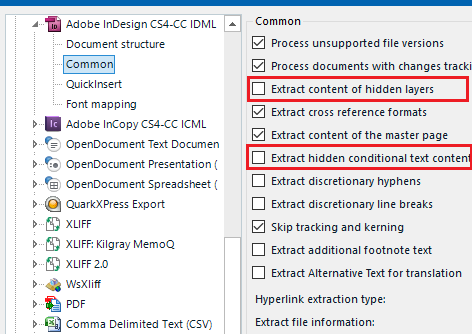
  • Never found this issue either, but I’d try ticking these 2 options in your Project Settings:

    Trados Studio Project Settings window showing options under Adobe InDesign CS4-CC IDML with two options ticked: 'Extract hidden conditional text content' and 'Extract content of hidden layers'.

    Then try to preview the IDML (Browse and Preview buttons below).

    If it still doesn’t work I can only think that the InDesign document has the text rastered, i.e., text is not editable, so the document is ready to go to the print shop on a free-problem workflow). In this case, and if you don’t have InDesign available to open the IDML and confirm whether the text is editable or not, check with your client that text is editable in InDesign, because you need the editable text in InDesign in order to extract it in Studio.

    I'm curious to know the reason of your problem, so please, don’t forget to post it when you know it.

    emoji


    Generated Image Alt-Text
    [edited by: Trados AI at 4:06 PM (GMT 0) on 28 Feb 2024]
Reply
  • Never found this issue either, but I’d try ticking these 2 options in your Project Settings:

    Trados Studio Project Settings window showing options under Adobe InDesign CS4-CC IDML with two options ticked: 'Extract hidden conditional text content' and 'Extract content of hidden layers'.

    Then try to preview the IDML (Browse and Preview buttons below).

    If it still doesn’t work I can only think that the InDesign document has the text rastered, i.e., text is not editable, so the document is ready to go to the print shop on a free-problem workflow). In this case, and if you don’t have InDesign available to open the IDML and confirm whether the text is editable or not, check with your client that text is editable in InDesign, because you need the editable text in InDesign in order to extract it in Studio.

    I'm curious to know the reason of your problem, so please, don’t forget to post it when you know it.

    emoji


    Generated Image Alt-Text
    [edited by: Trados AI at 4:06 PM (GMT 0) on 28 Feb 2024]
Children