


SDL Studio 2019 Tell Me Button


I started using this update from Studio 2017 yesterday, and leaving aside my dismay at the fact that it appears to add nothing to the version it replaces and is considerably slower (it's been years since I saw a spinning wheel between translation segments and this is a brand-new, good quality PC!) I would like to know if there is any way to remove the unsightly blue "Tell me what you want to do..." button to the top right of my screen. What I want it to do is to go somewhere sensible like in a ribbon or under a file menu. I also want SDL to explain to me why, after opening this function, I can't click it away but have to press ESC. Seriously?
So to summarise, two main questions: can I put the distracting and unsightly Tell Me button somewhere else, and why is the new version running more slowly than the one it's supposed to improve? I've done some Googling and it seems that I'm not the only one with this issue.
Thank you!
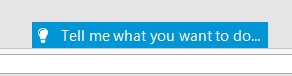
Blue 'Tell me what you want to do...' button located at the top right of the Trados Studio screen.

I want you to go away.


Generated Image Alt-Text
[edited by: Trados AI at 4:11 PM (GMT 0) on 28 Feb 2024]

emoji
  • Hello

    Thanks for your feedback- I dont think anyone else had raised this previously as an issue.

    The 'Tell Me' functionality was introduced so that users (both beginners and the more proficient user) can gain quick access to the functions and commands in Studio without having to dig deep into multiple menus and tabs. As this is an integral part of Studio, there is no way at this time you can 'hide' this feature- but maybe its worth suggesting in the ideas area of the community that in future this function could be optional and on demand.
    With regard to performance, we would appreciate any detailed information that you can provide- such as system/OS/where the projects are being accessed from/cloud/local etc.apps installed.
    The more information that we have the easier it is for us to try and remedy this and provide solutions.


    Oana Nagy | Developer Experience | QA Engineer | RWS Group

  • Thanks for your prompt reply Steven. I suppose in a way I was sooner venting my frustration than asking for a specific solution. It should be clear though that there is absolutely no excuse for this version to work more slowly than the previous one because it's running on precisely the same system (Windows 10, local), and even with the same user templates, etc. That said (and don't take this personally) but from what I've been Googling you know perfectly well that there are performance issues with this version. Also, the wretched thing has already crashed twice, which is about as many times as this happened the whole time I used the 2017 version.
    Oh well. When I get some time I'll file a support ticket and take it from there. Thanks again for your response.