


Batch task for analyse or pre-translate taking over 40 minutes. Is this normal or abnormal?

Hello,

Although the tasks do finish and progress slowly at a regular pace, the tasks themselves take a long time and I'm wondering if this is unusual. The benefit of batch tasks is that I can do other things while it works away in the background, but for my other users, or for when I'm in a hurry, this can be inconvenient.
My TMs are locally saved on a decently fast windows computer with 8 MB RAM. Solid state memory. Intel Core i5-7000U CPU 2.50GHz as a resource. I use 3 TMs that are updated and, I feel at least, are not very big. Language pair is Japanese to English.

TM1: 32000 units
TM2: 16100 units 
TM3: 32000 units

Target I did the pre-translate for was only 2500 segments.
Oh, wait, and it just finished... but the task isn't showing up in the report menu. This has happened before, but I'll save this for another topic. https://community.sdl.com/product-groups/translationproductivity/f/90/t/25082
Luckily I saved the task as an xlsx before closing the initial window.
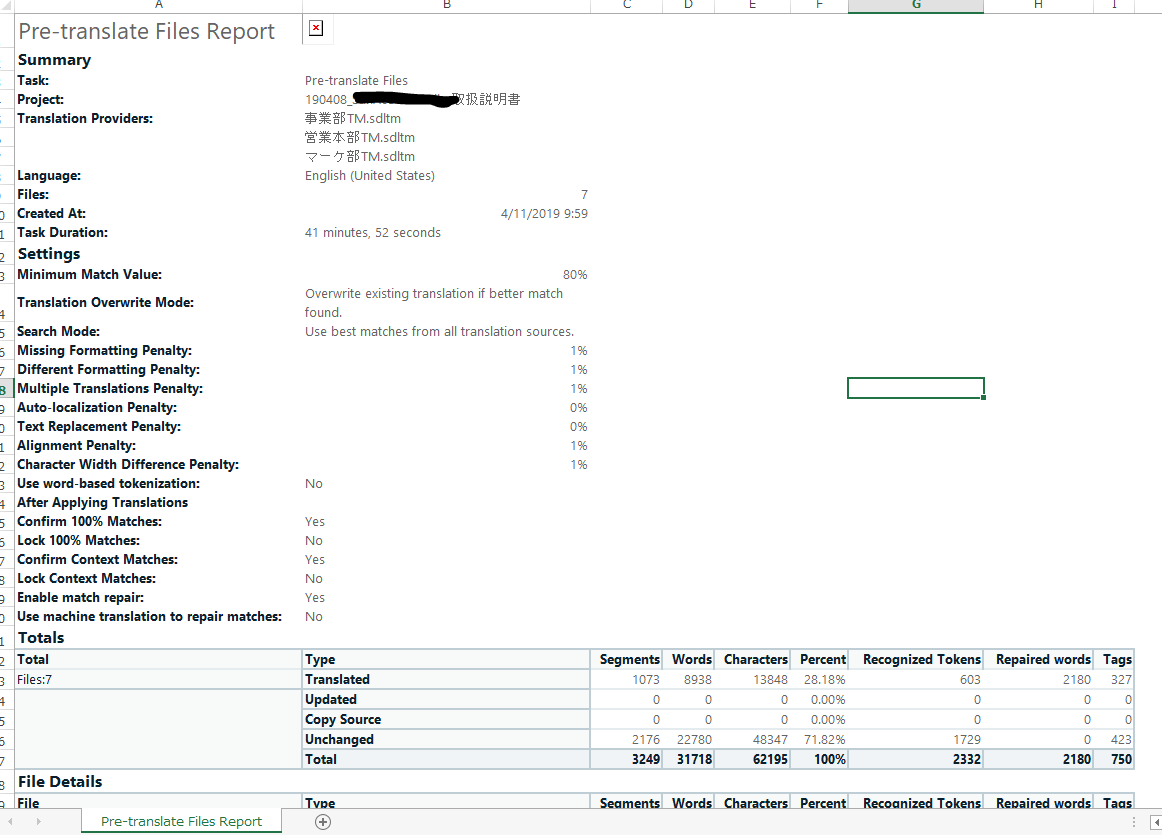
Screenshot of Trados Studio's Pre-translate Files Report showing summary details, language pair Japanese to English, and TM statistics with no visible errors or warnings.

Can anyone see any reason for it taking so long? Or, is this normal? 

Thank you.


Generated Image Alt-Text
[edited by: Trados AI at 4:46 PM (GMT 0) on 28 Feb 2024]
emoji
Parents
  • Hello

    As a former translation project manager running projects in Studio, I have experienced similar situations.

    I see in your report that there are multiple files in your project. Studio analyses / pre-translates each file one after the other, looking up one memory after the other, thus this process can take longer in case more files and more TMs are involved in general.

    However, 40 minutes for the pre-translation of 7 files seems quite long even with the above in mind. And considering that the report is not saved, there might be an underlying issue in your Studio.

    If you analyse the files only, how long does it take? With these 7 files and 3 TMs. Could you please confirm?
    Also, is the project also located on your hard drive?

    Hoping to hear back from you.

    Best wishes,
    Greta

    Greta Magyar - Customer Success Consultant - SDL

Reply
  • Hello

    As a former translation project manager running projects in Studio, I have experienced similar situations.

    I see in your report that there are multiple files in your project. Studio analyses / pre-translates each file one after the other, looking up one memory after the other, thus this process can take longer in case more files and more TMs are involved in general.

    However, 40 minutes for the pre-translation of 7 files seems quite long even with the above in mind. And considering that the report is not saved, there might be an underlying issue in your Studio.

    If you analyse the files only, how long does it take? With these 7 files and 3 TMs. Could you please confirm?
    Also, is the project also located on your hard drive?

    Hoping to hear back from you.

    Best wishes,
    Greta

    Greta Magyar - Customer Success Consultant - SDL

Children