
 Translate



Hi,
We have created a MultiTerm termbase containing the entries which are not relevant for translation. Strings enclosed with < > should not be translated (because the value will be inserted automatically). The translators have to know though what value will be inserted, so we have created a termbase containing this information.
The termbase is correctly generated from an Excel file (with Glossary Converter), however, Studio does not display the entries that are surrounded by < >. Please see the screenshot below.
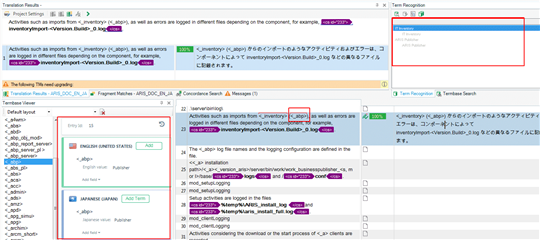
In the TU, you see that the entry <_abd> was found in the termbase. In the Termbase Viewer on the left side, you see the entry information properly. However, in the Term Recognition pane on the upper right, you do not see the source and target entries <_abd>.
I am thinking maybe it is a display problem in Studio, because in the termbase itself they are OK. I replaced <> with \<\> and also with < and > but still they are not displayed in the Term Recognition pane ( < and > are displayed, but not as brackets).
I hope you can see the screenshot properly here. Is there any workaround to display the entries enclosed with <>?
Thank you and regards,
Satoe
Generated Image Alt-Text
[edited by: Trados AI at 2:35 PM (GMT 0) on 1 Mar 2024]

