


Please help me fine tune my Terminology Verification settings because I am getting too many false positives

Hello, 

I'm doing my best to create robust, accurate TBs that can use Trados's terminology verification settings. I'm trying to streamline this verification process into our workflow and the amount of false positive errors I get makes the process, as it stands now, more of a harm than good.
These are my current settings:
Trados Studio project settings window showing verification settings with options for term consistency checks.
1. First I am getting errors incorrectly, for when say "industrial inverters" is written in the segment, but the TB has "industrial inverter" registered, so for a reason unclear to me, the "Check for possible non-usage of the target terms" throws an error. I also get errors when the target word is used but used with a comma. So something like "impeller," gets flagged because the verifier is looking for "impeller". Periods don't cause a problem but commas do. I'm unsure about other punctuation. 
Error message in Trados Studio indicating a term does not contain the translation 'industrial inverters' as expected.
Error message in Trados Studio indicating a term does not contain the translation 'impeller' as expected due to a comma.
I'm really hoping I don't need to make plural and singular entries for each term because that would clog up the window with too many terms and make the very function worthless.

2. This same phenomenon happens for synonyms as well. One synonym is used but the other, obviously, isn't but the verify throws an error because one isn't used. 
Error message in Trados Studio indicating a term does not contain the translation 'commercialized' as expected.

3. Another is that this function throws an error when a prohibited word isn't used. I made this TB with a picklist in the "status" column with approved (認定)and prohibited(禁止). Based on my settings above, if the prohibited word "commercialized" doesn't get used, an error gets thrown. And if the word does get used, it will throw an error. Only the latter is correct. 

Trados Studio message list displaying multiple terminology verification errors with details and status.

Thoughts welcome.


Generated Image Alt-Text
[edited by: Trados AI at 4:16 PM (GMT 0) on 28 Feb 2024]

emoji
Parents
  • Hi 

    you are asking a bunch of questions at once, but as for your first question, your "minimum match value" is set to 100, which means if there is any discrepancy the Terminology Verifier will report an error. I think the default setting is 70, and this value is something that might need some fine-tuning, but not as drastic as 100 for sure.

    [EDIT] Your second problem is caused by two entries in the TB for the same source term. Merge both entries and this will be solved.

    3. I also work with prohibited terms, but I never ran into this. Interesting. [More editing:] For me, this occurs when I only enter a prohibited term for a source term in the TB. It reports a waring (orwhichever severity you set in the project settings) if the prohibited term is not used and an error (or whatever is set) when the prohibited term is used. This is a bug, but, alas, a minor one in my eyes - my TBs are mainly for positive terms (should use) and occasionally a prohibited term (use this (preferred) or that (accepted) but do not use the other thing...)

    However, this is a bug and it would be good to see it fixed at some point. There are other issues with prohibited terms, they get autosuggested for example.

    As a workaround for now I would suggest using the QA Checker's Regex for such terms. This is really simple unless you have a huge list of terms that varies constantly. You can surely import and export Regex for projects and I think there are quitre a few free apps connected with this feature.

    Daniel

Reply
  • Hi 

    you are asking a bunch of questions at once, but as for your first question, your "minimum match value" is set to 100, which means if there is any discrepancy the Terminology Verifier will report an error. I think the default setting is 70, and this value is something that might need some fine-tuning, but not as drastic as 100 for sure.

    [EDIT] Your second problem is caused by two entries in the TB for the same source term. Merge both entries and this will be solved.

    3. I also work with prohibited terms, but I never ran into this. Interesting. [More editing:] For me, this occurs when I only enter a prohibited term for a source term in the TB. It reports a waring (orwhichever severity you set in the project settings) if the prohibited term is not used and an error (or whatever is set) when the prohibited term is used. This is a bug, but, alas, a minor one in my eyes - my TBs are mainly for positive terms (should use) and occasionally a prohibited term (use this (preferred) or that (accepted) but do not use the other thing...)

    However, this is a bug and it would be good to see it fixed at some point. There are other issues with prohibited terms, they get autosuggested for example.

    As a workaround for now I would suggest using the QA Checker's Regex for such terms. This is really simple unless you have a huge list of terms that varies constantly. You can surely import and export Regex for projects and I think there are quitre a few free apps connected with this feature.

    Daniel

Children
  • Daniel,

    Thanks for your response.

    1. My search settings are high on purpose (albeit too high). If I lower them too much, I get noise and inaccurate hits on the source side. Ideally, there'd be a way to make it 100 percent on the source side and lower on the target side to accommodate variations in just one language. There are rarely variations on the source Japanese side but variation in English is common because of sentence placement which affects capitalization, punctuation, and plurals
    For reference, I tinkered with the settings and here are the number of false positives I get depending on search match settings:
    100%: 29
    95%: 24
    90%: 20
    85%: 19 (here, started to get false positives on the Japanese side while English side false positives decreased)
    80%: 17 
    75%: 16
    72%: 16
    70%: 90 (mainly noise from the Japanese side. But some shorter English words like "AC Fan" still threw an error in the presence of "AC fans". 

    At this point, is this amount of false positives something that everyone just swallows or is there something I can do to make this number smaller so I can recommend this feature to my team in good conscience?
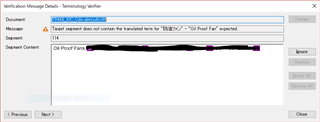
    What I can't understand is how I get exact matches all but for the presence of a comma. And that causes an error. Is this a bug too? The same error with "Oil Proof Fan" still happens and the only thing I can think is wrong is that it's "Oil Proof Fan,". That error stays until 71 percent then disappears at 70 percent. 

    2. Edit: Okay, I fiddled with the synonym settings within glossary converter and set it to multi-line so that I can keep my ideal excel settings of one term per line while Trados recognizes the synonym. Worked now I get a few less errors:-)

    3. I'm unclear what you mean the prohibited terms. Should they also be treated as a synonym in that they need to be written in the same cell with the same source? Suppose I can test that myself...
    And I'm not clear how regex can help with my termbase because there's really not many patterns. If it was measurements and numbers I could understand. If you could provide an example of how this would work that'd be appreciated.

  • Hi

    I had not quite realized that you were working with a TB you keep in Excel...

    Concerning point 3: It really depends on how many prohibited terms we are talking about. If there are a few that cause issues, you can simply do this:

    Trados Studio Project Settings window showing Regular Expressions tab with a list of expressions.

    Error message in Trados Studio indicating a missing term in the target segment with a red exclamation mark icon.

    and you get this:

    QA Checker 3.0 window in Trados Studio displaying a verification message for a Shackleton term found in both source and target.

    More at a later point.

    Daniel

    emoji


    Generated Image Alt-Text
    [edited by: Trados AI at 4:16 PM (GMT 0) on 28 Feb 2024]
