


Cannot Finalise Files for Review and I have to hand in today

Can someone please help? I haven't worked in Studio since 2014, and now I have the 2019 version, so, I'm basically a baby. I wanted to go through the manuals again etc. but got a review task out of the blue, and there's no better training than doing, right? The files were not sent as a package, but via We-Transfer as MQXLIFF and a TMX.

I dragged and dropped them into Trados and started reviewing. My computer did a restart overnight while everything was still open, and when I re-opened Trados, the project files were not there and I couldn't carry on. Played around and retrieved them, but now I can't finalise them.

I logged a case, but it seems the Help Desk staff are on Easter Break, and I have to hand in today. If anyone can help, please.

Helene
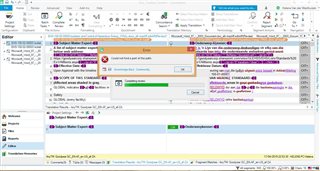
Trados Studio 2019 interface with an error message 'Failed to save target content: Object reference not set to an instance of an object.' in the foreground.


Generated Image Alt-Text
[edited by: Trados AI at 4:16 PM (GMT 0) on 28 Feb 2024]
emoji
Parents
  • Hi

    Try locating the project in windows and then open the sdlproj again using Open Project. If that doesn't work just create a new project with a different name from the original source files, and then replace the target language sdlxliff files in your new project with the ones from the original project.  That should allow you to open the project, which sounds as though it was corrupted somehow, and work from where you left off.

    I'd also note that Finalizing a project is not essential.  The only thing it does is update the memories, create target files and close the project.  None of these thigs are essential as the TM is probably already updated if you did this yourself, you can save target files at anytime without finalizing, and there is no need to close down a project.

    Paul Filkin | RWS Group

    ________________________
    Design your own training!

    You've done the courses and still need to go a little further, or still not clear? 
    Tell us what you need in our Community Solutions Hub

  • The files are already open in the editor view. If I go to Projects view, however, it is not there, and when I try and open it from Windows, it just keeps on telling me that the files are already open in Editor view, and from there I can't do anything. To do the whole new creation and replacement of the target files sounds too daunting. It was trial and error that brought me to where I am now, and on my skill level, I need someone to do this remotely, which is why I logged the case.

Reply Children