
 Translate



Hi y’all!
After having used Studio 2019 for about 6 months, I’m invoicing a direct client for the first time. The project contained 3 files and I’ve created a report choosing Batch Tasks / Analyze Files. However, while I’ve given these analyzes a cursory check many a time before accepting a project from an agency, I suddenly can’t seem to interpret them, never mind basing my invoice on them. Have I chosen the wrong type of report?
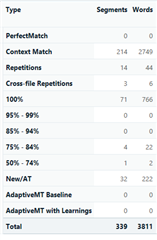
I’m looking for a report that tells me how many of the words that were new, how many that was CM or 100% matches etc. etc. Looking at the report 2,749 words are Context Matches out of 3,811 words, 222 words out of 3,811 are New… which looks backwards to me. While there was a consistent chunk of text that was identical in the 3 files, there’s no way that ONLY 222 words were new (and thus are invoiced at full price) and 2,749 were already available in the TM!
I get that there’s something I’m not getting but I don’t get what it is that I’m not getting? If you see what I mean…
Thanks in advance,
Alessandra
Generated Image Alt-Text
[edited by: Trados AI at 4:46 PM (GMT 0) on 28 Feb 2024]


