TMX from Wordfast = import failed

Dear All, 
I have already imported a good number of TMX derived from my Wordfast without any problems whatever.
All of a sudden, with the most important TM ever, Trados won't even display any error message; Trados behaves, as if it did not recognise the TM at all.
When I try to open the TMX file instead of the regular window (i.e. the four-step Upgrade Translation Memory), there is just a split second image of the window that disappears and no recognition results.

The size of the tmx file is 100 MB. I am puzzled. 
Would you get me out of this rabbit hole?
Regards,

Maciej

Parents Reply Children
  • And on top of this, I first heard of Sublime from you today. I have no literacy, no skill and getting disheartened slowly

  • I have a TMX file not an XML file...

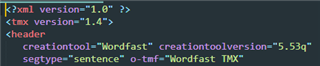
    TMX is XML... look at the header:

    Screenshot of TMX file header showing XML version and encoding with Wordfast as the creation tool and version 5.53q.

    And on top of this, I first heard of Sublime from you today. I have no literacy, no skill and getting disheartened slowly

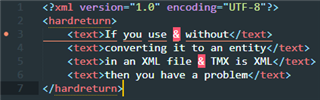
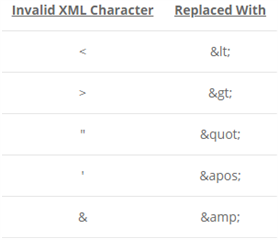
    Basically the problem is that Wordfast is exporting invalid XML so you have some segments in your TMX that you either need to remove, or fix.  These are the invalid chars in XML:

    Table showing invalid XML characters and their corresponding replacements, such as less than sign replaced with '<' and ampersand replaced with '&'.

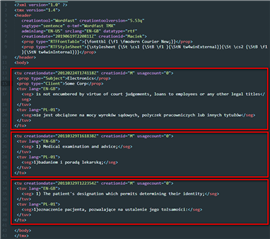
    In your file I removed the TUs instead of replacing the & with &amp; because they didn't look as though they should be there anyway and the TUs I removed were actually same source same target, missing source and only target, or just gibberish (not sentences at all)... so removing them was faster.  To do that you need to understand the structure of a TMX.  It's pretty simple, each TU has this structure.. I marked each one with a red square:

    Code snippet of a TMX file with Translation Units highlighted in red squares, indicating the structure to be removed if containing invalid XML characters.

    You can remove a complete TU (everything in the square) without damaging the file.  So my process was this:

    1. Identify which TUs had the invalid segments in them one at a time
    2. Decide whether it was worth attempting to replace the invalid char with the correct entity, or some other character, or not
    3. Replace the char, or delete the entire TU (what's in the red box)

    That's it.  Sometimes you can do smart replacements and perhaps the one from Jerzy with Notepad++ is clever enough to let you replace only the ampersands that should not be there, I don't know.  But that's the approach I took.

    I imagine others have their own way too... will almost certainly have a smart way of tackling these issues.

    But one thing is for sure... if you want to be able to handle things like this you need to read up a little on why it's necessary (google invalid XML), read up on how XML is structured (https://www.w3schools.com/xml/), and learn about TMX (https://en.wikipedia.org/wiki/Translation_Memory_eXchange)

    Paul

    Paul Filkin | RWS Group

    ________________________
    Design your own training!

    You've done the courses and still need to go a little further, or still not clear? 
    Tell us what you need in our Community Solutions Hub

    emoji


    Generated Image Alt-Text
    [edited by: Trados AI at 5:46 PM (GMT 0) on 28 Feb 2024]
  • Paul, 

    enough is enough. I am giving up on that editorial thing. I just thought I would run Sublime, load the file, Sublime would do modifications, and that's it. 
    Otherwise I would need to either ask for further assistance or forget about my unretrievable source (tmx) TMs. 
    Now it is the highest time I were expressing my both appreciation and gratitude for your ardeous work on casting some light for me on the issue at hand. Now I truly need a break.
    Best of luck Paul.