Translate



Hi,
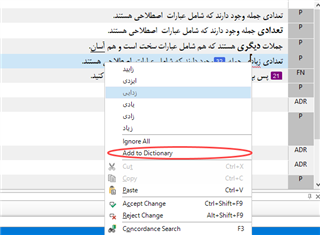
“Add to Dictionary” right-click command (like to MS Word) is a good option to add new words/phrases that unknown for Trados Studio. This feature like MS Word is not so smart and can’t recognize the correct form of words and thinks they are wrong, so red underlines appear below them. I guess we have thousands of words/phrases that we should add to the dictionary (actually I’m sure about The Persian Language that I speak with it and it’s my mother language). when Trados Studio guesses they are wrong, but they are correct completely and just need to use “Add to Dictionary” right-click command to stop Trados Studio from highlighting them with red underline as wrong or misspelled words.
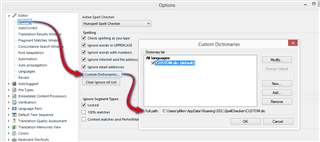
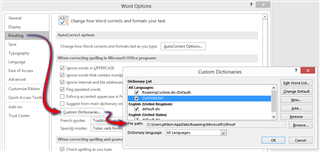
I’m new with SDL Trados Studio and learning it these days and enjoy it! If the words we add to the dictionary via “Add to Dictionary” right-click command; save to TM? If yes, it’s fine, but imagine I want to work on another project and start a new translation from scratch that needs a new TM. In this way, when I start to translate; Trados Studio starts to underline unknown words with red underline that I added them in a previous project(s) mostly and If I add them to dictionary again would be boring and time-wasting task while I can import them for my new project and translation job and Trados Studio recognizes them and doesn’t need to underline as wrong or misspelled words. Is it possible to save those words/phrase we added to the dictionary before and save in a safe place or even share with our friends who translate and work with SDL Trados Studio or other Cat Tools products?
Best,
Masoud,
Generated Image Alt-Text
[edited by: Trados AI at 11:49 PM (GMT 0) on 28 Feb 2024]