Using Enter as shortcut in SDL Studio 2019

Hello, 

It was working fine until hours ago. 

I have tried it all so far. Including editing sdlprofile under <SettingsGroup Id="ShortcutsSettingsGroup">

<Setting Id="ConfirmAndMoveToNextSegmentAction">
<Value>Enter</Value>
</Setting>

Nothing works. Disappointed

Add other ideas?

Parents
  • Hello ,

    I think a little more information could be helpful here.

    What were you doing before? Using a simple (Numeric Keypad) Enter to 'confirm and move to next segment' action?

    Normally a shortcut will consist of two or more keys- I don't think I have seen anyone using the simple Enter key for such a task before (which might even require the keyboard commands to be remapped.

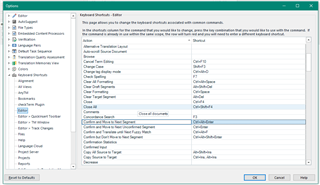
     The current default shortcuts can be viewed (and changed) here-

    Trados Studio Options dialog box showing Keyboard Shortcuts tab with a list of actions and their corresponding default shortcut keys.

    Oana Nagy | QA Engineer | RWS Group

    emoji


    Generated Image Alt-Text
    [edited by: Trados AI at 12:14 AM (GMT 0) on 29 Feb 2024]
  • Dear Steven,

    Thanks for your reply. J

    I have been using SDL for a long time :), when there was SLDX and TRADOS. When I started using Studio, the profile from SDLX came along, automatically, or so I believe.

    I personalize a lot, not only the ENTER. All other were easy to go back to my choices.

    The point is, I have been using ENTER (Num. or normal keypad) as the shortcut for 'confirm and move to next segment' action since then.

    I am quite sure, before I just had to copy 'ENTER' from some other command and paste using the mouse, CTRL+V would not work. Then, at some point I started editing the .sdlprofile file. :)

    All shortcuts were working fine, for over 10 years, several upgrades inclusive--until yesterday.

    Anyway, after editing all sdlprofile files, changing user profile, restarting computer... it worked. I could set up all my shortcuts as before, not only Enter. 

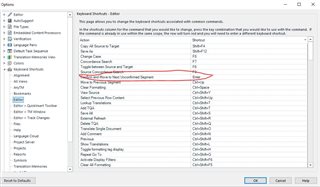
    Trados Studio options menu showing keyboard shortcuts customization with 'Confirm and Move to Next Unconfirmed Segment' action highlighted and set to 'Enter'.

    I've solved it, but again, many thanks.

    emoji


    Generated Image Alt-Text
    [edited by: Trados AI at 12:14 AM (GMT 0) on 29 Feb 2024]
Reply
  • Dear Steven,

    Thanks for your reply. J

    I have been using SDL for a long time :), when there was SLDX and TRADOS. When I started using Studio, the profile from SDLX came along, automatically, or so I believe.

    I personalize a lot, not only the ENTER. All other were easy to go back to my choices.

    The point is, I have been using ENTER (Num. or normal keypad) as the shortcut for 'confirm and move to next segment' action since then.

    I am quite sure, before I just had to copy 'ENTER' from some other command and paste using the mouse, CTRL+V would not work. Then, at some point I started editing the .sdlprofile file. :)

    All shortcuts were working fine, for over 10 years, several upgrades inclusive--until yesterday.

    Anyway, after editing all sdlprofile files, changing user profile, restarting computer... it worked. I could set up all my shortcuts as before, not only Enter. 

    Trados Studio options menu showing keyboard shortcuts customization with 'Confirm and Move to Next Unconfirmed Segment' action highlighted and set to 'Enter'.

    I've solved it, but again, many thanks.

    emoji


    Generated Image Alt-Text
    [edited by: Trados AI at 12:14 AM (GMT 0) on 29 Feb 2024]
Children