
 Translate



Hi everybody,
I have a file that is full of ordered list inserted as plain text, like this:
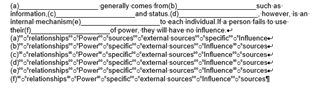
By default, segmentation results in this:
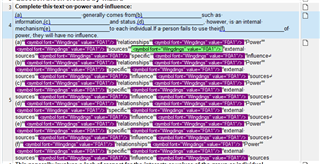
I cannot edit the source (the target will be imported automatically, I cannot replace newline with carriage returns). And also, I would need trados to recognise the list, and segment consequently the content.
In other part of the file things are a bit better:
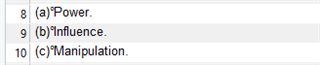
But again, I'd like to have the ordered list "bullet" excluded from the segment.
I couldn't manage to find a segmentation rule that works.
For the time being I entered the "bullets" as variables, in order to better leverage the TM (at least), but I would need a "clean" file.
Thank you!
Generated Image Alt-Text
[edited by: Trados AI at 5:14 PM (GMT 0) on 28 Feb 2024]


