


Termbase search terms appearing in reverse order!

Hi everyone!

I have a strange problem. When I perform a Termbase Search in my open Termbase Search window, a bunch of terms appear. But the problem is that the order of the terms appearing is reversed to what it should be!

Let me explain. Ideally, the terms in termbase that are closest to the term I am actually searching should appear FIRST, and then, as the match score lowers, the terms should be appear in decreasing order. So, ideally, if I search for a term, the results of my seach that match the term exactly or closely enough should appear at the beginning, while the terms that are more different should appear at the bottom.

As things are now, the opposite happens. Terms most alike to the ones I am searching appear at the bottom of the list. Of course, if I have 40+ search results, that means I ALWAYS have to scroll down.

Why is this happening?

Another issue related to the first. I am not able to limit the Mínimum Match Value % and never have been. The result is that even I set this parameter to 100%, I get a LOT of garbage results and the only interesting ones are placed last!

I'll try to attach images. These are my Search Settings within Termbases.
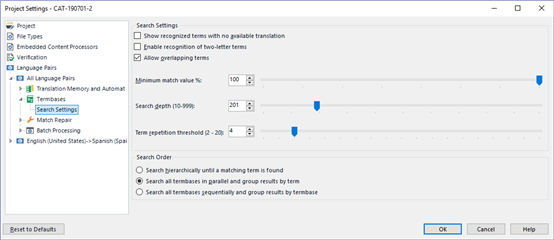
Screenshot of Trados Studio Project Settings showing Search Settings with Minimum match value % set to 100.

And If I try to search the term Stream in my termbase I get a lot of garbage such as
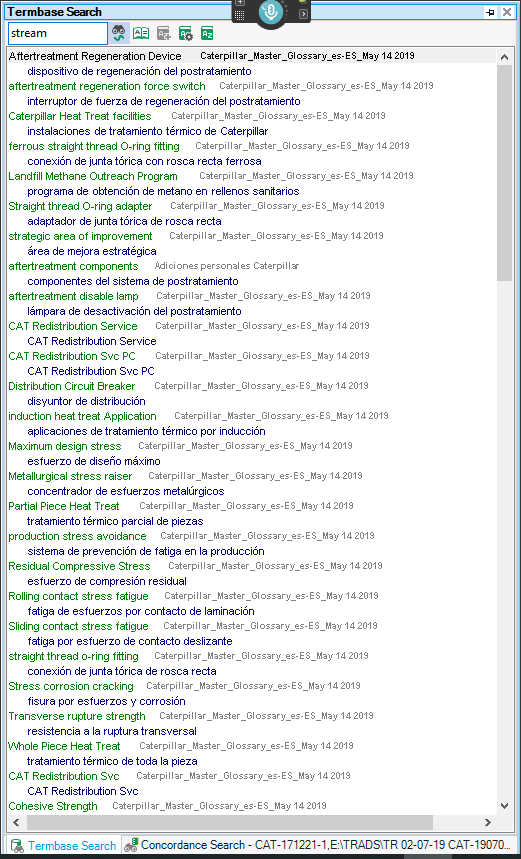
Screenshot of Trados Studio Termbase Search results with irrelevant terms like 'Aftertreatment Regeneration Device' listed before the searched term 'stream'.

Notice that as the terms are placed LOWER, the search results are getting closer to "Stream" . Notice also the SIZE of the scroll bar at the right, showing that I have over 50 results! The last esults are the ones that actually have the word "STREAM" on them and not "STRENGH", "STRESS" or some other crazy term. I will show you the same previous search with the scroll bar scrolled ALL THE WAY DOWN.
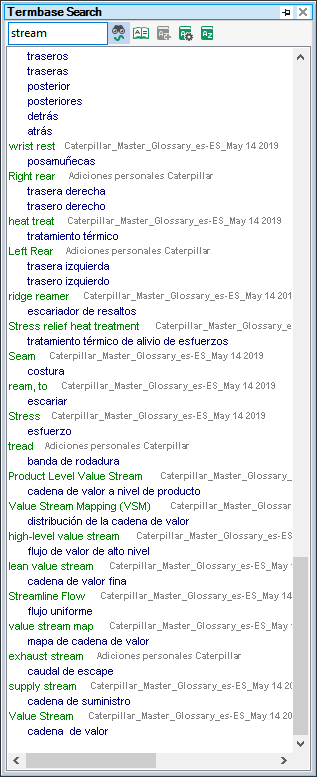
Screenshot of Trados Studio Termbase Search scrolled down showing more relevant terms like 'Product Level Value Stream' closer to the searched term 'stream'.

Notice that as I go lower and lower, terms are becoming more similar to "stream" until at the end I FINALLY FIND the terms of the termbase that include the word Stream.

Any of you knows about this, know how to solve this or whether this is a bug or something I am doing wrong??? Because this is extremely annoying for me, you can see how large my termbases are, and not being able to limit Match Searches and getting results in the wrong order is complicating things a LOT for me. Remember, changing Search Settings, Mininum Match % does nothing (I have just shown you a search with 100% match search settings!!!)

Thanks!


Generated Image Alt-Text
[edited by: Trados AI at 11:38 PM (GMT 0) on 28 Feb 2024]
emoji
Parents
  • Hi

    Very interesting, I experience the same. I hardly use the Termbase Seach function of Studio, I use the term recognition and if I want to look something up I use MultiTerm, but to my astonishment, I get comparable results. As if the sort order was upside-down. If I do a fuzzy search in MultiTerm I get the reverse (correct) order. , I think this is a bug.

    Daniel

  • Hi! I am happy that someone shares the error (omg, that sounds bad, doesn't it?) In any case, Multiterm search does not cut it for me, because firstly I don't want to be changing applications for every term search (I have to perform hundreds), secondly because I have several termbases and Trados allows me to search ALL OF THEM at the same time, and thirdly because I don't see an easy way of viewing source and target simultaneously in the Hitlists.

    But I have noticed that, truly enough, the order of results is correct and I couldn't help but notice a second thing.. the fuzzy search is much more logical (that is, it needs a closer match to show).

    It's interesting that Trados shows Aftertreatment Regeneration Device as a fuzzy match for "Stream" (the only similarity I can conclude is that both terms have the string "TREA" in them... while in Multiterm the worst result is "lines of STRESS" (I consider STRESS to be much more alike to STREAM than AFTERTREATMENT.

    Another thing I noticed is that Multiterm search order (i.e. fuzzy match search) is slightly different from Trados. While most of the results are placed similarly (accounting for the fact that Trados results are upside down), the order is slightly different.

    In Trados the results for Stream are... (in reverse order, of course, best terms appear at the bottom, and the terms I list are shown from best match to worse matches)

    Stream: Value Stream>>Supply stream>>Value Stream Map>>Streamline Flow, etc.

    While in Multiterm, the appearing order for the results

    Stream: Value Stream>>Supply stream>>Streamline Flow>>Value Stream Map, etc.

    So the fuzzy search procedures for Multiterm are slightly different. And the limitartion for only good results is much higher, Trados presents A LOT of garbage results which only a few letters matching my term!

    But all these examples only tries to explain some curious differences between Trados and Multiterm searches, while the reality is that I am not interested in Multiterm searches. If only the same Fuzzy Search procedure from Multiterm could be used in Trados, instead of the mess it has implemented, it would be a perfect Term Search!!! At least in Multiterm it works fine!

    Edit: Now that I think of it, I am not really sure why for Multiterm "Streamline Flow" is a better match for the term "STREAM" than "Value stream Map"… Hmm… I believe I agree with the order the Trados system presents better...

Reply
  • Hi! I am happy that someone shares the error (omg, that sounds bad, doesn't it?) In any case, Multiterm search does not cut it for me, because firstly I don't want to be changing applications for every term search (I have to perform hundreds), secondly because I have several termbases and Trados allows me to search ALL OF THEM at the same time, and thirdly because I don't see an easy way of viewing source and target simultaneously in the Hitlists.

    But I have noticed that, truly enough, the order of results is correct and I couldn't help but notice a second thing.. the fuzzy search is much more logical (that is, it needs a closer match to show).

    It's interesting that Trados shows Aftertreatment Regeneration Device as a fuzzy match for "Stream" (the only similarity I can conclude is that both terms have the string "TREA" in them... while in Multiterm the worst result is "lines of STRESS" (I consider STRESS to be much more alike to STREAM than AFTERTREATMENT.

    Another thing I noticed is that Multiterm search order (i.e. fuzzy match search) is slightly different from Trados. While most of the results are placed similarly (accounting for the fact that Trados results are upside down), the order is slightly different.

    In Trados the results for Stream are... (in reverse order, of course, best terms appear at the bottom, and the terms I list are shown from best match to worse matches)

    Stream: Value Stream>>Supply stream>>Value Stream Map>>Streamline Flow, etc.

    While in Multiterm, the appearing order for the results

    Stream: Value Stream>>Supply stream>>Streamline Flow>>Value Stream Map, etc.

    So the fuzzy search procedures for Multiterm are slightly different. And the limitartion for only good results is much higher, Trados presents A LOT of garbage results which only a few letters matching my term!

    But all these examples only tries to explain some curious differences between Trados and Multiterm searches, while the reality is that I am not interested in Multiterm searches. If only the same Fuzzy Search procedure from Multiterm could be used in Trados, instead of the mess it has implemented, it would be a perfect Term Search!!! At least in Multiterm it works fine!

    Edit: Now that I think of it, I am not really sure why for Multiterm "Streamline Flow" is a better match for the term "STREAM" than "Value stream Map"… Hmm… I believe I agree with the order the Trados system presents better...

Children