
 Translate



Hello
I installed SDL Trados Studio 2019 SR2 last week and I noticed that the Termbase Viewer layout keeps resetting each time I close/re-open Studio.
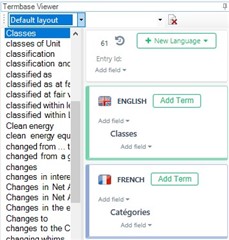
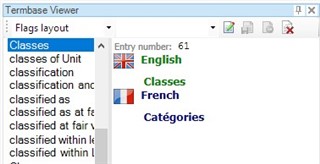
My preferred layout is the "Default layout" (quicker to edit entries) but Studio systematically reverts back to the "Flags layout" (not as user-friendly). In MultiTerm 2019 (CU4), my layout preferences ("Default layout") are kept.
I remember having that issue a few CUs ago and it was later fixed. I think it was OK in my previous version of Studio (SR1 CU3).
Has anyone experienced this issue with SDL Trados Studio 2019 SR2? Any suggestions? Thanks in advance for your help.
I’m attaching screenshots showing my current Studio/MultiTerm settings as well as the TB Viewer layouts mentioned.


Generated Image Alt-Text
[edited by: Trados AI at 5:50 PM (GMT 0) on 28 Feb 2024]



