Concordance search does not work with shared TMs

Hi All!

This is not a question and more like a bug report/warning for everyone working with SDL Trados Studio and sharing translation resources between two or more people.

When several TMs are used by different people on the same project at the same time (by reading all TMs and writing only to one like it is described in this Paul Filkin’s article), the concordance search will not work. It means that when a new segment is added to TM by someone, other people will not be able to “concordance search” for it (there will be no results). At the same time, this segment will appear in the Fragment Match and Translation Results windows as a fuzzy or 100% match. It does not matter if TMs are stored in the cloud (DropBox, OneDrive) or on a network drive, or if people are working in the same network or from different locations.

This bug can be easily reproduced by running two instances of SDL Trados Studio on the same machine and opening two different documents for translation with the same TMs. When segments from one document are added to TM, run the concordance search of translated phrases in the second Trados instance for another opened document and there will be no results. They will appear only after restarting the Trados instance.

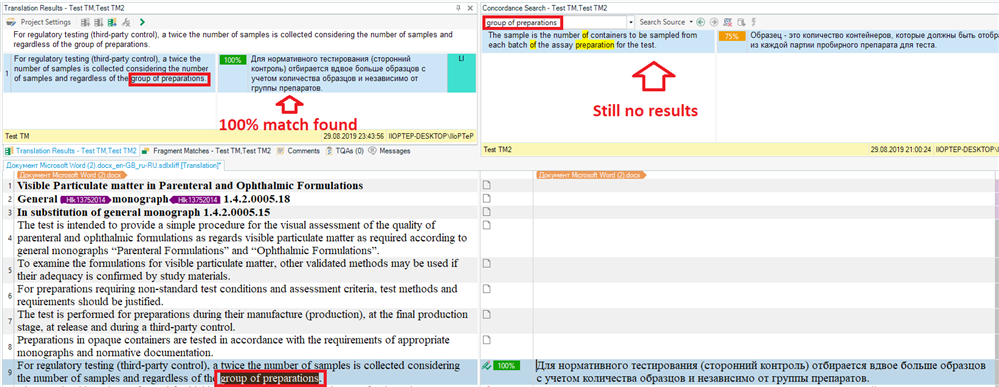
On the screenshots below I translated a sentence with a phrase “group of preparations” and updated Test TM, but when I tried to concordance search for “group of preparations” in another project with connected Test TM (opened at the same time in another Trados instance), there were no results. But when I moved to the exact segment in the second document, the translation appeared in the Translation Results window.

First project (first Trados instance):
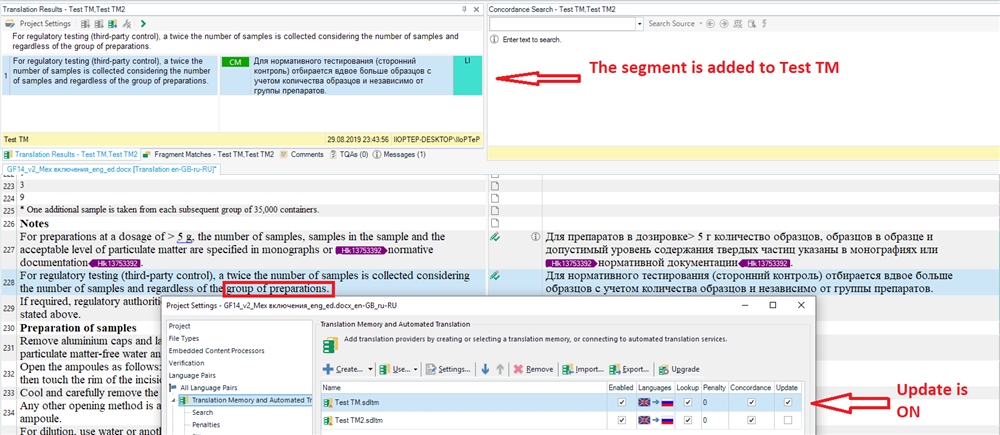
Screenshot of Trados Studio showing a segment added to Test TM with update option turned on.

Second project (second Trados instance):
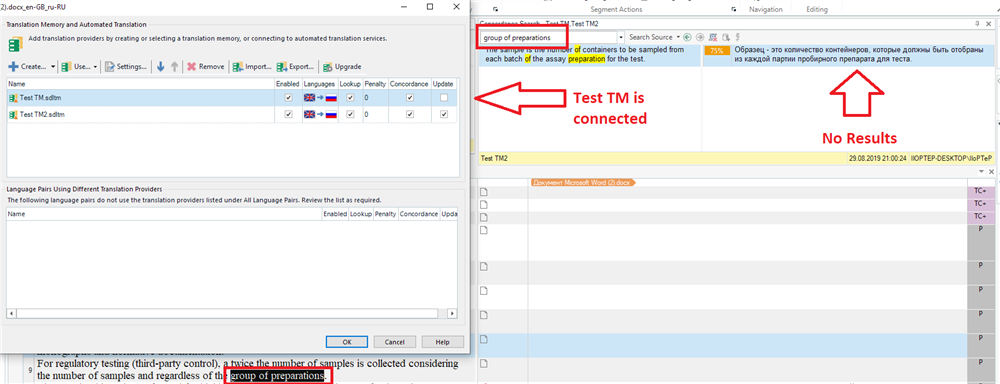
Screenshot of Trados Studio with Test TM connected but concordance search for 'group of preparations' yields no results.

Screenshot of Trados Studio displaying a 100% match found in Translation Results, yet concordance search still shows no results.

This bug is present in Studio 2017 (SR1) and Studio 2019 (SR1) and it is not only annoying but leads to inconsistences in translations because users are unable to manually search for phrases added by their colleagues when working with shared TMs.

The only solution to this problem I’ve found so far is to regularly restart Studio. Hope this topic will be helpful for anyone thinking about using the same TMs with other translators for big projects.


Generated Image Alt-Text
[edited by: Trados AI at 6:05 PM (GMT 0) on 28 Feb 2024]

emoji
  • Try disabling lookahead on the other machines, then try again.

    Paul Filkin | RWS Group

    ________________________
    Design your own training!

    You've done the courses and still need to go a little further, or still not clear? 
    Tell us what you need in our Community Solutions Hub

  • Tried it. No difference. At work we’ve tested this in Studio 2015 and 2014 — the bug presents even in these older versions.

  • I've looked into this a little as it seems I'd forgotten that this point you have raised about concordance not working was already mentioned in the comments to my article in 2014!

    So I tested it again this week with a colleague and indeed it's still not anything that works.  However, I do not think this is a bug because sharing TMs in this way isn't anything that is actually supported anyway.  We are one of the few providers who can technically support the sharing of a file-based TM like this, and I say "technically support" because whilst it is possible it is not a supported feature in the product and it's not anything we ever promote.  We do give guidance on how it can be used but there are limitations and concordance seems to be one of them.

    I discussed this with a developer to understand why cncordance fails and the reason is because when you commit a TU (translation unit) from within Studio three things happen:

    1. the TU is written to the TM
    2. the in-memory index cache for the local machine is updated
    3. the in-TM index is updated every 30 minutes or so

    The result of this is that the remote machine won't get the in-memory index updates immediately and therefore won't be able to find a concordance result for new TUs.  Not a bug, just the way the solution was designed as this is for file-based TMs that work locally on your computer.  So you can do this and get TM lookups but you won't get the full beneft from this until the TM index has completely updated and is available on both machines.

    The correct way to share TMs for unrestricted access and use is currently via SDL GroupShare and I fully expect to see something more in this area in the near future.  But I don't believe changing the way Studio currently works will be changed in this regard.

    Paul Filkin | RWS Group

    ________________________
    Design your own training!

    You've done the courses and still need to go a little further, or still not clear? 
    Tell us what you need in our Community Solutions Hub