 Translate



When I try to align the documents, this error message popped up: Could not find a part of the path...
How can I solve it?

When I try to align the documents, this error message popped up: Could not find a part of the path...
How can I solve it?
Hello @희옥 박
It is always helpful if you post the full error stack and explain what you were doing when the error occurred-
Are the file(s) stored locally or on a server maybe?
Do you have full access rights to where the file is saved?
Do you have admin rights on the PC?
Any additional information you can provide could be useful.
Oana Nagy | QA Engineer | RWS Group
I have the exact same problem.
I saved the files in multiple locations, both on my own computer (C:) and various network drives, same problem with all of them. No wonder that it says the path is wrong, though, since the path shown by the error message starts right but then contains some extra stuff that's not really pointing to the original location I was trying to reach, namely e.g. C:\users\vilma.kokko\appdata\local\temp\sdltempfilemanager\... while my original file is obviously in C:\users\vilma.kokko\... I see the bit in the middle is something added by Studio but even Studio itself clearly doesn't benefit from the addition since it can't find the file using the (wrong) path.
Have tried reopening Studio, doesn't help. Have no admin rights but obviously the right to use and access the folders I saved the files into.
Any ideas on what to do? I was trying to make things easier with this, not more difficult. 

Hello Vilma Kokko,
Saving the same files in multiple locations is probably not helping here.
I would suggest saving the files to a location such as e.g.-
C:\users\yourname\Documents\Studio 2019\files for alignment (create a new folder ).
Now delete all the other folder paths so you only have the one.
Now when you open Studio and point to this folder you shouldn't have an issue.
Its worth noting also, if you do have enough admin rights on the computer, this may be blocking your access so you might want to check with your organisations IT department.
TIP
When you post in the community- its always worth starting a new thread if the current one has not been active for some time. Otherwise, your post could easily be missed.
When you have an error message- its also a really good idea to post this in the community as well as this provides a lot of information that could be useful.
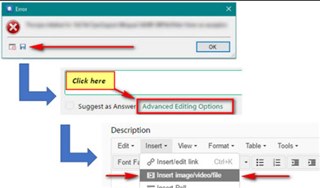
Save the XML to your desktop and then simply attach using the insert option.
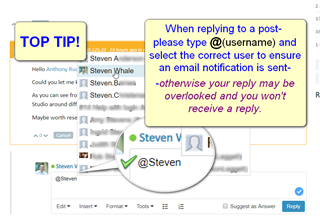
If replying to someone specific- please tag that person
Oana Nagy | QA Engineer | RWS Group

