
 Translate



Hello,
I have just installed the updated version SR2 of Studio 2019 Freelance Edition. However, I noticed that when I added a new file to the project I am working on, the translation memory is blank, even though I made sure to update it.
Here is the error message I get every time I click on a segment:

Can someone please advise me what to do to fix this?
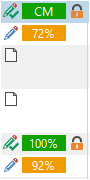
I would like to add that even though the translation suggestion does not appear at the "Translation Result" window because of that error above, there are CM, 100% and fuzzy matches in the file itself, so it is a bit confusing:
The troubleshooting steps I've taken so far are:
1 - Remove the translation memory from the project and re-add it. (The error continues with the old TM)
2 - Upgrade the translation memory by using the old one to create a new one in this new SR 2 version. (The error continues with the Old & New TM)
3 - Update MultiTerm. (The error continues with the Old & New TM)
4 - Create new blank File-Based TM. (The error continues with the Blank TM).
5 - Restarted the computer. (The error continues with the Blank TM).
Nothing worked, and the only difference I get in the error is the change of the name of the file of the TM.
Not troubleshooting, but more like an update:
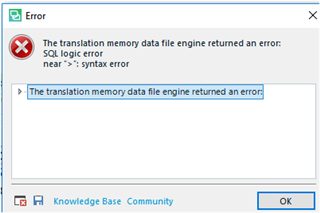
6 - I Continued working because I can't delay my client for too long. The same error popped in an error window when I confirmed a translation:
I searched the "knowledge base" and the "community" but no one mentioned the exact problem I have, at least as I understood it.
I have attached the error details to this message, as I believe it is more informative than all my description here:
<SDLErrorDetails time="09/16/2019 1:01:28 PM">
<ErrorMessage>The translation memory data file engine returned an error:
SQL logic error
near ">": syntax error</ErrorMessage>
<Exception>
<Type>Sdl.LanguagePlatform.Core.LanguagePlatformException, Sdl.LanguagePlatform.Core, Version=1.6.0.0, Culture=neutral, PublicKeyToken=c28cdb26c445c888</Type>
<HelpLink />
<Source>Sdl.LanguagePlatform.TranslationMemoryApi</Source>
<HResult>-2146233088</HResult>
<StackTrace><![CDATA[ at Sdl.LanguagePlatform.TranslationMemoryApi.FileBasedTranslationMemoryLanguageDirection.SearchSegment(SearchSettings settings, Segment segment)
at Sdl.TranslationStudio.Editor.Autopropagate.FuzzyAutopropagationProvider.AutopropagationIndex.SearchSegment(SearchSettings searchSettings, ISegment searchSegment, IAutopropagateSettings autopropagateSettings)
at Sdl.TranslationStudio.Editor.Autopropagate.FuzzyAutopropagationProvider.GetMatchingSegments(ISegmentContainerNode segmentContainerNode)
at Sdl.TranslationStudio.Editor.Autopropagate.SegmentAutopropagater.GetMatchingSegments(ISegmentContainerNode targetSegment)
at Sdl.TranslationStudio.Editor.TranslationEditor.SideBySideDocumentEditingView.AutopropagateSegment(ISegmentContainerNode segment)
at Sdl.TranslationStudio.Editor.TranslationEditor.SideBySideDocumentEditingView.CheckConditionsAndAutopropagateSegment()
at Sdl.TranslationStudio.Editor.TranslationEditor.SideBySideDocumentEditingView.ConfirmSegment(Nullable`1 segmentNavigationFilter)
at Sdl.TranslationStudio.Editor.TranslationEditor.Actions.AbstractConfirmSegmentAction.ExecuteActiveSegment()
at Sdl.TranslationStudio.Editor.TranslationEditor.Actions.AbstractConfirmSegmentAction.Execute()
at Sdl.Desktop.Platform.Implementation.CommandBars.ActionService.<>c__DisplayClass30_0.<ExecuteAction>b__0()
at Sdl.Desktop.Logger.Log.Resources(Object message, Action action)
at Sdl.Desktop.Platform.Implementation.CommandBars.ActionService.ExecuteAction(IAction action, ActionOrigin origin, Boolean allowToggle)
at Sdl.Desktop.Platform.Implementation.CommandBars.ActionService.ExecuteActionForShortcut(Keys shortcut)
at Sdl.Desktop.Platform.WinForms.StudioWindowForm.OnKeyDown(KeyEventArgs e)
at System.Windows.Forms.Control.ProcessKeyEventArgs(Message& m)
at System.Windows.Forms.Form.ProcessKeyPreview(Message& m)
at System.Windows.Forms.Control.ProcessKeyPreview(Message& m)
at System.Windows.Forms.Control.ProcessKeyPreview(Message& m)
at System.Windows.Forms.Control.ProcessKeyPreview(Message& m)
at System.Windows.Forms.Control.ProcessKeyPreview(Message& m)
at System.Windows.Forms.Control.ProcessKeyPreview(Message& m)
at System.Windows.Forms.Control.ProcessKeyPreview(Message& m)
at System.Windows.Forms.Control.ProcessKeyPreview(Message& m)
at System.Windows.Forms.Control.ProcessKeyPreview(Message& m)
at System.Windows.Forms.Control.ProcessKeyPreview(Message& m)
at System.Windows.Forms.Control.ProcessKeyPreview(Message& m)
at System.Windows.Forms.Control.ProcessKeyPreview(Message& m)
at System.Windows.Forms.Control.ProcessKeyPreview(Message& m)
at System.Windows.Forms.Control.ProcessKeyPreview(Message& m)
at System.Windows.Forms.Control.ProcessKeyPreview(Message& m)
at System.Windows.Forms.Control.ProcessKeyPreview(Message& m)
at System.Windows.Forms.Control.ProcessKeyPreview(Message& m)
at System.Windows.Forms.Control.ProcessKeyMessage(Message& m)
at System.Windows.Forms.Control.WmKeyChar(Message& m)
at System.Windows.Forms.Control.WndProc(Message& m)
at System.Windows.Forms.Control.ControlNativeWindow.OnMessage(Message& m)
at System.Windows.Forms.Control.ControlNativeWindow.WndProc(Message& m)
at System.Windows.Forms.NativeWindow.Callback(IntPtr hWnd, Int32 msg, IntPtr wparam, IntPtr lparam)]]></StackTrace>
</Exception>
<Environment>
<ProductName>SDL Trados Studio</ProductName>
<ProductVersion>15.0.0.0</ProductVersion>
<EntryAssemblyFileVersion>15.2.0.1041</EntryAssemblyFileVersion>
<OperatingSystem>Microsoft Windows 10 Home</OperatingSystem>
<ServicePack>NULL</ServicePack>
<OperatingSystemLanguage>1033</OperatingSystemLanguage>
<CodePage>1252</CodePage>
<LoggedOnUser>DESKTOP-DIBUQ04\since</LoggedOnUser>
<DotNetFrameWork>4.0.30319.42000</DotNetFrameWork>
<ComputerName>DESKTOP-DIBUQ04</ComputerName>
<ConnectedToNetwork>True</ConnectedToNetwork>
<PhysicalMemory>8255088 MB</PhysicalMemory>
</Environment>
</SDLErrorDetails>
Thanks in advance for your help!
Noha
Generated Image Alt-Text
[edited by: Trados AI at 6:21 PM (GMT 0) on 28 Feb 2024]

