 Translate



Hello,
Is it possible to replace 2 with 2 formatted in subscript in the word CO2, e.g. using regex or in any other way, in Trados Studio?
Thanks for any help in advance.
Sandor

Hello,
Is it possible to replace 2 with 2 formatted in subscript in the word CO2, e.g. using regex or in any other way, in Trados Studio?
Thanks for any help in advance.
Sandor
Probably not if your file format means the controls for subscript are actually tags. Maybe in the underlying sdlxliff using regex. Or perhaps in the final target file... depending on the format and capability of the target application.
Paul Filkin | RWS
Design your own training!
You've done the courses and still need to go a little further, or still not clear?
Tell us what you need in our Community Solutions Hub

Hi, is this still the case? There are no tags visible in the source or target segment around the subscript in CO2. Source file is a Word doc. Thanks


If it is a Word document, you should be able to see the subscript buttons in the Home tag and the tags in target:
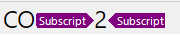
Or at least the number 2 formatted as subscript if tags are configured to be hidden:
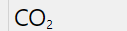
You can change how tags are shown in File > Options > Editor > Formatting display style: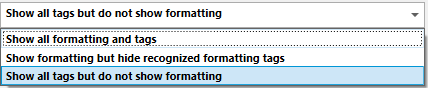
Another possibility is that the Unicode for # 2 in subscript (i.e., ₂) is being used in both Source and Target.


And if this isn't the case:
If it is a Word document, you should be able to see the subscript buttons in the Home tag and the tags in target:
Then the answer is still the same:
RE: Replace text with subscript
There isn't a feature to be able to search & replace with tags in the sofware.
Paul Filkin | RWS
Design your own training!
You've done the courses and still need to go a little further, or still not clear?
Tell us what you need in our Community Solutions Hub

Thanks Jesús and Paul for the info. I was shocked to learn that I had to find and replace manually!

Thanks Jesús and Paul for the info. I was shocked to learn that I had to find and replace manually!

Why can't you just replace CO2 with CO₂?
Because 'CO₂' is created in Studio xliffs using subscript tags either side of the 2 (this may or may not be visible to you, as Jesús explained above). Unfortunately, it is not possible to use tags in the Find and Replace dialog box, so it is not possible to batch replace 'CO2' with 'CO₂' in Studio. I have to manually insert the subscript tags in every segment where 'CO2' appears. This is a major shortcoming and it would be great if this option was introduced in future Studio versions.
You could solve this using this application - https://multifarious.filkin.com/product/sdlxliff-refiner/
It's restricted to only manipulating tags that are already in the source document because not all tags will work in any format, but as long as the sdlxliff has at least one segment with these subscript tags you can do the search replace.
Paul Filkin | RWS
Design your own training!
You've done the courses and still need to go a little further, or still not clear?
Tell us what you need in our Community Solutions Hub
But it is not necessary to use tags for the subscript 2. You still can use an ASCII code. Am I correct in my understanding that you want to replace plain CO2 with CO₂? If so, you don't need tags for that.