 Translate



Hi friend's,
I am working .psd file in SDL Trados 2019. Everything working fine but while doing exporting to original format.
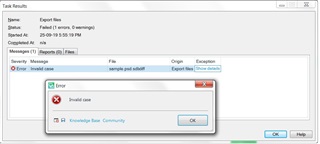
It's getting an error "Invalid case".
Generated Image Alt-Text
[edited by: Trados AI at 9:39 PM (GMT 0) on 28 Feb 2024]


Hi friend's,
I am working .psd file in SDL Trados 2019. Everything working fine but while doing exporting to original format.
It's getting an error "Invalid case".
Hello Balachander D ,
Do you have PhotoShop installed? Are you able to open this file and check whether it has the required embedded links to the packages?
If you don't have Photoshop- could you please send me the file (swhale@sdl.com) and we can check if this has been formatted correctly or not
Oana Nagy | QA Engineer | RWS Group
Hello Balachander D ,
Do you have PhotoShop installed? Are you able to open this file and check whether it has the required embedded links to the packages?
If you don't have Photoshop- could you please send me the file (swhale@sdl.com) and we can check if this has been formatted correctly or not
Oana Nagy | QA Engineer | RWS Group

I don't have Photoshop application in my system. Client has given the .PSD file and it's opening fine in there end.
But without having Photoshop application SDL tardos should give the output file right
Now we have completed all other process exporting part only pending in our end

It's a help for if you use the @ with the name, then he gets a notification and can reply...
Daniel
Hi Steven whale
Can you guide

Hi , I am experiencing the same issue with a .psd file. How should the psd file be formatted? I don't have Photoshop on my computer but a colleague could help. thanks for your support.

Hello Claudia Costaro ,
It would help if you could post the full error stack as this might shed some light on the issue-

What happens if you copy the original file, rename it then open it as a single file translation, then immediately save target as?
If there is an issue at this stage, then it maybe the original source file that is the problem.
Photoshop files are fairly complicated with lots of elements- so the more info you can provide, the easier it might be to find the cause.
Oana Nagy | QA Engineer | RWS Group
Hi and thanks for the quick feedback. Here you find the error stack,.
I've just tried toopen the file as single file and simply save it as target without doing anything else and got this error,.
Hello Claudia Costaro ,
Thanks for the error stack- this does seem to indicate a problem with the file (layered text within the image possibly)
Would you be able to send it to me please (swhale@sdl.com) and we can have a look for you.
Alternatively if you can't, you mentioned you have a colleague, who should be able to open this and see where the errors lie.
Oana Nagy | QA Engineer | RWS Group
Hello Claudia Costaro ,
Just wanted to update you on this issue- this is now logged as a bug (LF-4710).
This is in relation to PS v1.4.4 and the fix should be released with a future Studio update.
Oana Nagy | QA Engineer | RWS Group