Numbers: automatic copying and application of "translated"/"translation approved"?

SDL v. 2019

Is there any way of getting SDL to just copy numbers (segments without any alphabetic text) from Source to Target... and automatically apply "Translated" or "Translation Approved" as the segment status?

I find it very strange that this is not default behaviour in my current setup.

  • Hi 

    Actually, automatic translation of numbers is the default behaviour in Studio.

    If you want the numbers to be confirmed as Translated, once you have translated one number-only segment to your translation memory, any number-only segment in any job translated using that TM thereafter is automatically translated as part of the pretranslate batch task and will be given Translated status.

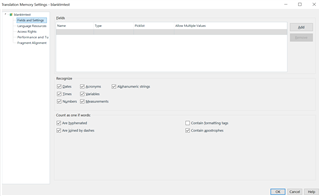
    The default setting of a TM is to recognise numbers, so make sure that they are ticked in the TM you're using:

    Translation Memory Settings window in Trados Studio showing options to recognize numbers, dates, measurements, and alphanumeric strings.

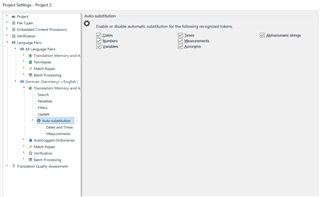
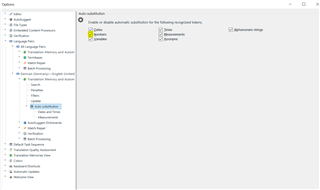
    Even without a translation memory, however, it is the default setting to have auto-substitution of numbers turned ON under any language pair in your profile or in project settings that have a language pair added, as demonstrated here in a project's settings:

    Project Settings window in Trados Studio with Auto-substitution section for numbers, dates, and measurements highlighted.

    this means you can pretranslate without a TM and the number-only segments will be automatically translated and given AT status.

    So, the language pair has to be present in the project settings if you're working with projects or project templates.

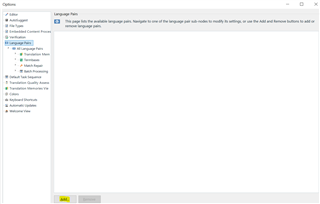
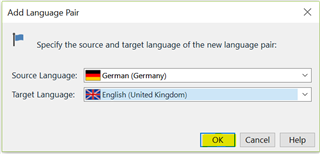
    Alternatively, you can add language pair/s to your global profile via File>Options>All language pairs>Add:

    Options window in Trados Studio showing Language Pairs section with an empty list and an Add button.

    Add Language Pair dialog box in Trados Studio with dropdown menus for selecting source and target languages, set to German and English respectively.

    Options window in Trados Studio with Auto-substitution settings for numbers, dates, and measurements under All Language Pairs.

    The default setting for a language pair is always to translate number-only segments automatically, giving them the AT status (Automatic Translation) but you can use a display filter to select 'Number only' segments then highlight them all and change their status to Translated, or you can just confirm the first one and the rest will automatically be confirmed.

    I think I've covered everything, ask me if not Wink

    All the best,

    Ali Slight smile

    emoji


    Generated Image Alt-Text
    [edited by: Trados AI at 7:09 PM (GMT 0) on 28 Feb 2024]
  • Hi,

    Thanks and sorry for the time in replying to your reply.

    All those settings are as expected in my TM and my project settings.

    I am getting no automatic number substitution whatsoever, though.

    I have posted a new post which poses the question more specifically: community.sdl.com/.../sdl-2019-auto-substitution-of-numbers-not-working