Issues with line breaking and some symbols in html

Hello,

I've got two problems with exporting translated html documents (actually pseudotranslated, in case it makes any difference...). I have Studio 2019.

1)  Export changes line breaking. This is the original line breaking:

Screenshot of HTML code with correct line breaks and no visible errors.

and this is the same segment in translation:

Screenshot of HTML code with altered line breaks, potentially causing display issues.

I'm not an expert in html, but according to my client, this is an issue.

2) Some symbols are replaced by their respecitve entities, only if the whole text segment is enclosed in curly brackets and this segment appears in the content:

symbol > is replaced by > as seen here:

Screenshot of HTML code showing symbol '>' replaced by '>' within curly brackets. becomes Screenshot of HTML code showing symbol '"' replaced by '&quote;' within curly brackets.

symbol " becomes &quote; as seen here:

Screenshot of HTML code with an image source link and no visible errors. becomes Screenshot of HTML code with an image source link and visible replacement of double quotes with entities.

I have unticked the "entities conversion" option, as suggested in this thread https://community.sdl.com/product-groups/translationproductivity/f/studio/10477/problem-exporting-html-file but it still doesn't help.

I will appreaciate any help.


Generated Image Alt-Text
[edited by: Trados AI at 6:39 PM (GMT 0) on 28 Feb 2024]

emoji
Parents
  • Hi Jakub,

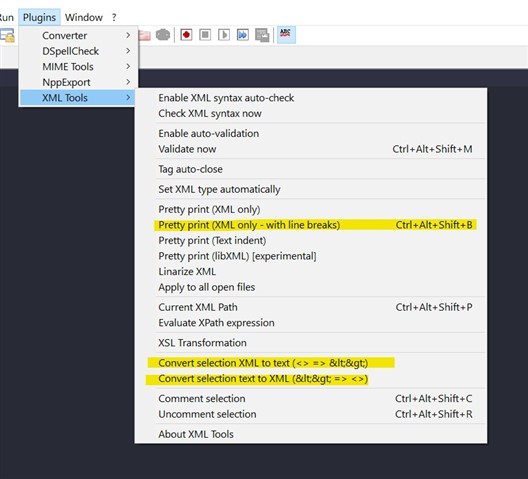
    Most of those issues you got there can be solved by XML Tools (plug-in for Notepad++).

    Screenshot of Notepad++ with XML Tools plugin menu open, highlighting the 'Convert selection XML to text' and 'Convert selection text to XML' options.

    • Dodaj do Rozmówki
      • Brak listy słów na angielski -> polski ...
      • Utwórz nową listę słów ...
    • Kopiuj
    emoji


    Generated Image Alt-Text
    [edited by: Trados AI at 6:40 PM (GMT 0) on 28 Feb 2024]
  • Hello Tomasz,

    thank you for your answer.

    I am sure the way you proposed will help me solve my problem, but honestly, I was hoping for a solution that wouldn't require me to use another software. Frankly, I don't want prepare every file before importing it or after exporting it from Trados...

    However, in the meantime, I found the solution to both of my problems. The problem with symbols conversion is quite counter-intuitive. I had to go to Advance settings in the Entities menu and untick all the options, even though I had previously unticked the "Enable entities conversion" option.

    The line breaking problem was solved by importing the file in its original format. It's not originally an html, but actually a variant of html, so in my first attempt, I saved it as html before importing it to Trados, which led to the issue with line breaking. But then I added this specific file format to the list of formats that should be treated as html by Trados and the issue with incorrect line breaking disappeared.

    Again, thank you for your proposal, I really appreciate your help.

Reply
  • Hello Tomasz,

    thank you for your answer.

    I am sure the way you proposed will help me solve my problem, but honestly, I was hoping for a solution that wouldn't require me to use another software. Frankly, I don't want prepare every file before importing it or after exporting it from Trados...

    However, in the meantime, I found the solution to both of my problems. The problem with symbols conversion is quite counter-intuitive. I had to go to Advance settings in the Entities menu and untick all the options, even though I had previously unticked the "Enable entities conversion" option.

    The line breaking problem was solved by importing the file in its original format. It's not originally an html, but actually a variant of html, so in my first attempt, I saved it as html before importing it to Trados, which led to the issue with line breaking. But then I added this specific file format to the list of formats that should be treated as html by Trados and the issue with incorrect line breaking disappeared.

    Again, thank you for your proposal, I really appreciate your help.

Children