 Translate



InDesign 2020 is available and nudging all users to upgrade. Were there big changes to the file format?
Did anybody try working with the new IDMLs and ICMLs already?
Daniel

InDesign 2020 is available and nudging all users to upgrade. Were there big changes to the file format?
Did anybody try working with the new IDMLs and ICMLs already?
Daniel
Seeing as it's quiet in here , I did get an IDML from a user last week who said he could not open it in Studio. But checking the box to handle unsupported formats resolved it easily and it seemed to work fine. Nothing conclusive or exhaustive so far.
What's your experience to date?
Paul Filkin | RWS
Design your own training!
You've done the courses and still need to go a little further, or still not clear?
Tell us what you need in our Community Solutions Hub

Hi Paul,
Do you have any news on this by now? I just e-mailed you regarding an IDML file that won't open in Studio 2017. Is this to be expected, or should it work?
Kind regards,
Johanna

Have processed more than 10 of such files with no problems so far. But you need to use Studio 2019, 2017 may indeed cause problems. So I would not expect 2017 to work with files from 2020.
_________________________________________________________
When asking for help here, please be as accurate as possible. Please always remember to give the exact version of product used and all possible error messages received. The better you describe your problem, the better help you will get.
Want to learn more about Trados Studio? Visit the Community Hub. Have a good idea to make Trados Studio better? Publish it here.

Do you have any news on this by now? I just e-mailed you regarding an IDML file that won't open in Studio 2017. Is this to be expected, or should it work?
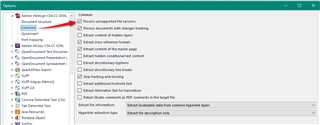
Same as before... if you check the open supported formats checkbox if opens just fine. I tested your file in 2017 and this opened without any issues. You need this:
Paul Filkin | RWS
Design your own training!
You've done the courses and still need to go a little further, or still not clear?
Tell us what you need in our Community Solutions Hub

That box is ticked - and I've tried it both in Studio 2017 and in Studio 2019, with three different IDML files created from the same indd file, and on two separate computers. Each time, it takes a few minutes to open the file, and then Studio crashes ... Everything in the dialogue box above is the same in my settings. Could there be some other settings that interfere?
That box is ticked - and I've tried it both in Studio 2017 and in Studio 2019, with three different IDML files created from the same indd file, and on two separate computers. Each time, it takes a few minutes to open the file, and then Studio crashes ... Everything in the dialogue box above is the same in my settings. Could there be some other settings that interfere?
I had another play with this file and once I tried to scroll it Studio crashes. I then opened it in InDesign and this was also problematic for me, possibly the size and unresolved links, I’m not sure.
Perhaps you can get another file from your client?
Paul Filkin | RWS
Design your own training!
You've done the courses and still need to go a little further, or still not clear?
Tell us what you need in our Community Solutions Hub
Thanks Paul, I'll check with the client on Monday and see if they can try making a new version. I tried reducing the file size by removing pages in the indd file, but even with only 15 % of the pages left I still couldn't open the idml file in Studio, so there seems to be some other issue rather than the size.
Hello again Paul,
I now downloaded a trial version of MemoQ and could open the file there without any problems, so it seems that there's nothing wrong with the idml file after all. So I really I wonder what it is that causes the problems in Trados Studio. I'm reluctant to switch to MemoQ, having worked with Trados products for 20 years, so I really hope to find some solution.
For the time being, until another solution has been found, save the file in MemoQ. Export there bilingual to mqxliff, translate this in Studio, import in MemoQ and create a target file there.
_________________________________________________________
When asking for help here, please be as accurate as possible. Please always remember to give the exact version of product used and all possible error messages received. The better you describe your problem, the better help you will get.
Want to learn more about Trados Studio? Visit the Community Hub. Have a good idea to make Trados Studio better? Publish it here.
Thanks for the tip Jerzy! That's what I will probably have to do, although it will mean having to buy a MemoQ license, since the trial version will expire before I can finish this assignment. I was really hoping to be able to solve the problem in Studio, but the client has now sent me a new file and it didn't change anything.
Could the solution be splitting the file (maybe simply in sdlxliff) into smaller chunks. You can also go that way: export from MQ on your PC. Then, when finished take a PC of someone else, copy the MQ project from your PC there, install a trial there just before finishing, double click the project file and use this MQ copy for finishing. I understand, this is not the way it should work, but a workaround, and a very unconventional one, but it should help you to deliver. And in the end of the day this is what counts.
_________________________________________________________
When asking for help here, please be as accurate as possible. Please always remember to give the exact version of product used and all possible error messages received. The better you describe your problem, the better help you will get.
Want to learn more about Trados Studio? Visit the Community Hub. Have a good idea to make Trados Studio better? Publish it here.