The Trados cloud platform will be undergoing maintenance on Saturday, 9th May 2026 between 05:00 to 17:00 UTC. During this time, you will not be able to log in to the Trados platform.

Impossibilité de créer un projet, et impossibilité d'enregistrer la cible sous

Bonjour,

Je n'ai pas réussi à créer un nouveau projet (voir fichier joint) aussi j'ai choisi l'option Traduire en tant que document unique.

Et une fois ma traduction terminée, je n'ai pas réussi à enregistrer la cible sous (voir fichier joint)....cela devient pénible.

D'autre part, même en faisant un log off puis log on à nouveau, Language Cloud ne veut plus s'intégrer dans Trados (en cas de besoin je suis donc obligée de l'utiliser hors Trados).

Merci par avance pour votre aide.
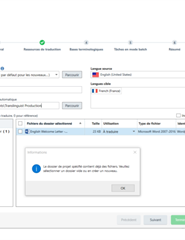
M.Anne  Error message in Trados Studio stating 'An error occurred while trying to create the project. OK'.DOCXTrados Studio screenshot showing a failed attempt to save the target file with an error message in the background.DOCX


Generated Image Alt-Text
[edited by: Trados AI at 9:36 PM (GMT 0) on 28 Feb 2024]
emoji
  • Hello ,

    Thanks for the screen shot. These are always helpful.

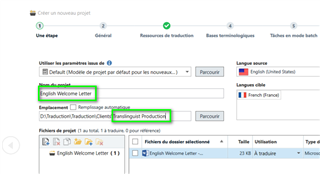
    I think the issue here is that the 'Nom du project' and the path in 'Emplacement' are not the same (Translinguist production) and they need to be.

    Trados Studio screenshot showing a mismatch between 'Nom du project' as 'English Welcome Letter' and 'Emplacement' path as 'Translinguist Production'.

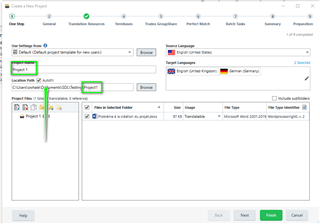
    eg

    Trados Studio 'Create a New Project' window with 'Project Name' field highlighted, indicating the need to match the location path.

    Please try to create a new project- enable autofill and  now when you enter the project name you should no longer have an issue.


    Oana Nagy | QA Engineer | RWS Group

    emoji


    Generated Image Alt-Text
    [edited by: Trados AI at 9:36 PM (GMT 0) on 28 Feb 2024]
  • Bonjour ,
    lorsque vous créez un projet, vous devez aussi créer un dossier VIDE et le sélectionner.
    En effet Trados cherche un dossier vide pour y mettre d'autres dossiers et fichiers et notamment
    Un dossier pour la langue source (où il enregistre le fichier bilingue tel qu'il est dès le début du projet)
    Un dossier pour la langue cible (où il enregistre le fichier bilingue tel qu'il est enregistré au fur et à mesure de la traduction)
    Le fichier projet (dont vous ne vous servez pas, mais qui est indispensable car il contient tous les paramètres de votre projet)

    Donc, quand vous créez un nouveau projet vous devez cliquer dans "emplacement" => parcourir. Une fenêtre s'ouvre et vous allez chercher le dossier de votre projet. Là, vous créez un nouveau dossier (que vous nommerez comme vous le souhaitez, en général je préconise de donner un nom qui vous rappelle le projet). Vous sélectionnez ce dossier et vous cliquez sur OK.

  • About your first screenshot, Alessia gave you the answer: always select an empty folder to create there the project.

    About your second question, did you remove/ rename the source file or move it to somewhere else after opening in Studio?  If you did anything like that, you're asking for problems. From your screenshots, I think you renamed the XLIFF appending the language codes. Please, don't do that. If you still have the problem, create another project, and let the translation memory to translate your file. Then you'll be able to create the target file.

    About your third question, Language Cloud, I'd first update Trados Studio (your version is quite old). Go to the Notification window on the right hand side, and click on the Download button. Then try again with Language Cloud and let us know if it works.

    I hope it helps,