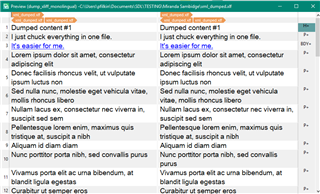
Long XLF segments from client's CMS export

Hello! This question was asked during the Q&A session this afternoon, and I believe Paul said that it's a high-level query so posting here:

We have received an XLF from a client containing really long segments - how can we re-segment these long segments so it's easier for the translators to work on them, but also so it doesn't affect the XLF from being re-imported into the client's CMS at the end of the project?

Thanks in advance for any assistance on this point!
  • Thanks for sending the question into here... more space and time to answer it!  But first note that this isn't the best way to prepare XLIFF and if you have a willing client they might be prepared to listen and follow the intent of the XLIFF specification to avoid these sort of workarounds.

    If they won't you basically have two options:

    1. use the embedded content filter in the XLIFF filetype
    2. treat the file as if it was monolingual and handle it using a custom XML filetype

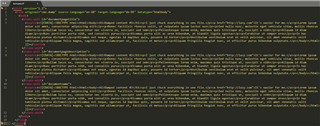
    So I mocked up a file like this:

    Screenshot of XML code in Trados Studio with CDATA sections highlighted in yellow.

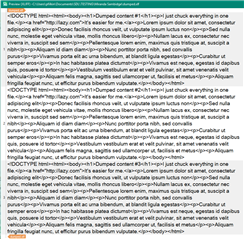
    In Studio when I open it I see this which is probably reprepsentative of what you are seeing:

    Text view of an XLIFF file in Trados Studio showing content within CDATA sections.

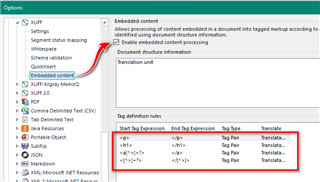
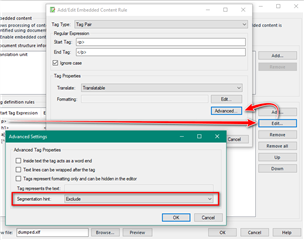
    It's all in just three segments, one for each of the Translation Units in my file.  To solve this I need to use the embedded content option and add a few rules to pick up the tags and exclude them to force the segmentation:

    Trados Studio options menu highlighting the embedded content filter settings for XLIFF file type.

    Dialog box in Trados Studio showing advanced settings for embedded content processor with 'Exclude' option selected.

    Now when I open the XLIFF I get this:

    Preview of translated content in Trados Studio with source and target text displayed side by side.

    Depending on the complexity of the content in your CDATA section (which is what I believe you have) this is probably the simplest solution.  But if not then just create a monolingual filetype and handle it that way.  In my example there is no target element in the XLIFF yet, so I just opened it with Studio, copied source to target and saved the target file.  Now I have this one:

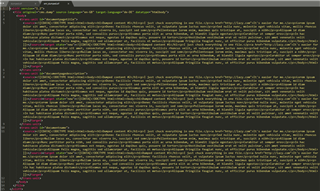
    Screenshot of XML code in Trados Studio with target elements highlighted in yellow.

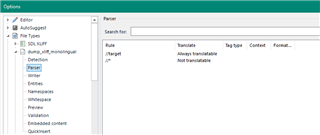
    I can now create a custom XML filetype to translate the target element alone and use the embedded HTML filetype to handle the markup and segmentation.  So my filetype has two simple rules:

    Trados Studio parser options menu showing a rule set to 'Always Translate' content.

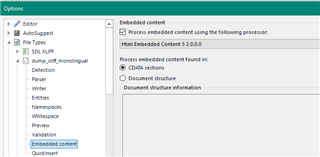
    The embedded content processor is set up like this:

    Trados Studio embedded content options menu with HTML embedded content processor selected.

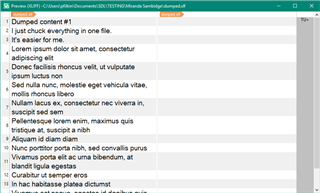
    The result is this:

    Preview in Trados Studio comparing source and target text after applying custom XML file type.

    I didn't dwell on how to create a custom XML filetype but if you need more help with that this may help:

    https://multifarious.filkin.com/2014/06/01/custom-xml/

    I also put my sample here so you can have a play... that may help too:

    dumped_XLIFF.zip

    Paul Filkin | RWS Group

    ________________________
    Design your own training!

    You've done the courses and still need to go a little further, or still not clear? 
    Tell us what you need in our Community Solutions Hub

    emoji


    Generated Image Alt-Text
    [edited by: Trados AI at 7:20 PM (GMT 0) on 28 Feb 2024]
  • We have received an XLF from a client containing really long segments - how can we re-segment these long segments

    You actually SHOULD NOT "re-segment" anything, this MUST be done at the client's side in the CMS export routine!
    This export is simply INCORRECTLY created.

    Putting entire HTML code into a CDATA structure in XLIFF "envelope" is plainly WRONG and only confirms that the creator of the export routine has absolutely no clue about proper XLIFF format.

    Such content should be thrown right back at the client with a reference to XLIFF specification and "No, try again" message.

    And Paul should actually clearly state in all such his answers that this is a WORKAROUND (for the f*cked-up export), not a solution.

  • And Paul should actually clearly state in all such his answers that this is a WORKAROUND (for the f*cked-up export), not a solution.

    Yes... I probably should.  But sometimes it's just more important to be able to solve the problem because you can't always explain this to the client and even if you do they might not listen.  This happens so often I used this as an opportunity to create a post I can refer to in the future.

    I'll edit to to reflect your view.

    Paul Filkin | RWS Group

    ________________________
    Design your own training!

    You've done the courses and still need to go a little further, or still not clear? 
    Tell us what you need in our Community Solutions Hub