
 Translate



Hi there,
I am wondering if there is a bug in Studio or if what I am trying to do simply not possible.
For some reason, on one of our accounts, client reviewers often send back reviewed sdlxliff files with random instances of the "<br>" tag at then end of target segments, as in the screenshot below:
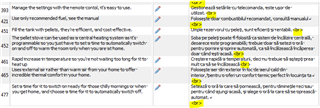
The client asked us to make sure these tags are removed from the final deliverable, so I thought we should simply be able to do a Search & Replace in Studio, where we search for <br>, leave the Replace field empty and then simply click Replace All.
However, when you do this and click Replace All, rather than actually replacing all instances, Studio just replaces the 1st instance and then stops. So you then have to click Find Next, click Replace All again to replace the next instance, Studio stops again, etc., etc.
From my tests, the issue seems to be that you cannot replace the last character of a segment with nothing in Studio (though you can replace anything else with nothing).
So for instance, you can search for <br in Studio and ‘replace all’ with nothing (so you are just left with > at the end of the segment).
Or you can search for <br> and ‘replace all’ with a space as a space is something and not nothing (so you are left with an extra space at the end of the segment).
But neither of that is acceptable to the client, sso we need yo have <br> as a whole to be replaced with nothing.
Does anybody have any idea on how to do this? Or why Studio would not allow this?
We have projects with hundreds and hundreds of segments where this appears, so simply searching and replacing one by one is not really an option.
Any tips welcome!
Thanks, Neeltje
Generated Image Alt-Text
[edited by: Trados AI at 2:42 PM (GMT 0) on 1 Mar 2024]


