 Translate



AND Multiterm to properly.
Thanks.
Generated Image Alt-Text
[edited by: Trados AI at 9:37 PM (GMT 0) on 28 Feb 2024]


AND Multiterm to properly.
Thanks.


ah..
This place, there is no "Delete Post" functionality
I have found my solution.
I have gone back to Good Old version safely.
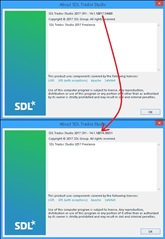
SDL Trados Studio 2017 SR1 - "14.1.10017" has a BUG
So what was the answer you found please? I'm looking for the same thing.

Hi Alison HIGH,
Here is the path you take to roll back to a previous version:
Control panel > Programs and features > Installed updates
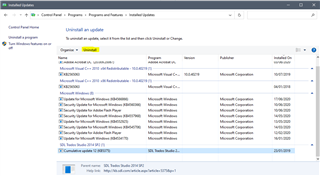
The most recent installed update for Studio 2014 should be in the list.
Highlight it then click 'Uninstall'.
If you don't know how to find 'Control panel', type it into the search box next to your Windows Start button bottom left of your computer screen:

Hope this achieves what you need solved.
If not, running a Windows Repair on your current version via Control panel > Programs and features will solve lots of performance issues...
Let us know how you get on,
All the best,
Ali 

Thanks but it's Trados 2017 and it's not in my list of windows updates. I'm not looking to repair the program, I'm looking to roll-back to a version in which I could have multiple documents open as if they were one document and put comments on those documents and still be able to save the file (files) without getting an error message as I always could before one or two of the more recent updates.
Apparently I have to uninstall and reinstall so that's not really what I'd call an update rollback.
Hi Alison HIGH,
If you uninstall, it doesn't take long. No need to deactivate your license if reinstalling.
Then download the version that is on your account and install that but don't update it until another version comes out which will hopefully have resolved whatever problem you're wishing to avoid.
What is the problem, anyway?Also, why don't you want to try a Windows Repair? I use this method on any complex software if there's been a recent major Windows update. Windows Repair is there to smooth things out in case of conflicts between non-Windows software and Windows, because that can occur. I use it periodically to sort out Microsoft Office, for example.
All the best,
Ali 
Other people on this forum have had the same problem I had and it is linked to a recent minor version update. Other threads say the way other people have dealt with the problem caused by the minor version update by rolling back. Windows repair doesn't roll back a version update so it will not deal with the problem which is caused by the update. The other forum posts did not mention HOW to roll back.
I mentioned what the problem is: I could have multiple documents open as if they were one document and put comments on those documents and still be able to save the file (files) without getting an error message as I always could before one or two of the more recent updates.
That is the problem, one of the main reasons if not THE main reason I updated to Trados 2017 was to open several documents at the same time and work on them and save them as if they were one document. This is no longer possible as soon as I add a comment to my translation which I always do somewhere along the line. This is most frustrating and time consuming when there's a translation to be done with 24 different documents!
Hi again Alison HIGH,
I believe people actually do mean uninstalling and reinstalling when they say 'roll back'.
In fact, here are SDL Support's instructions on how to roll back, first step:
How to correctly uninstall the latest update and roll back
then a link at the bottom of the page takes you the next step (rather than you just going to the original version listed on your account):
Where to find the installers for each cumulative update
This leads you to a list of links so you can identify the year and specific update you want, which for you will be here:
Hadn't looked for that page before, so this is useful to me should I need to roll back in future.
I hope that this now answers your question adequately.
For further interest on this subject, another process that some people are referring to when they say 'roll back' is here:
Restore from a system restore point
This only works if you have already set up system restore points on your PC.
All the best,
Ali
I am very technically minded. When I say roll back an update I mean roll back an update, I don't mean completely uninstall and reinstall a piece of software, I just want to uninstall the modifications brought about by the update that is making working with Trados way more frustrating.
If I roll back a windows update, I do not completely remove windows from my system before re-installing it!
Someone mentioned it would be nice to have an option within Trados for removing the most recent update or two. I think that would be a good idea.
If I roll back a windows update, I do not completely remove windows from my system before re-installing it!
Studio used to use updates that worked in a similar way. But the range of changes we have been making more recently require the complete installer. So you cannot roll back in the same way you can with a windows update.
If you want to install an earlier version you have to remove the current version first, and please make sure you do this properly using the remove suite of products option.

Paul Filkin | RWS
Design your own training!
You've done the courses and still need to go a little further, or still not clear?
Tell us what you need in our Community Solutions Hub

Glad this is now clearly stated somewhere on this forum for other users to see.
It's also here:
https://gateway.rws.com/csm?id=kb_article_view&sysparm_article=KB0024972
And this is going to be helpful too:
https://gateway.rws.com/csm?id=kb_article_view&sysparm_article=KB0027380
Paul Filkin | RWS
Design your own training!
You've done the courses and still need to go a little further, or still not clear?
Tell us what you need in our Community Solutions Hub
It's also here:
https://gateway.rws.com/csm?id=kb_article_view&sysparm_article=KB0024972
And this is going to be helpful too:
https://gateway.rws.com/csm?id=kb_article_view&sysparm_article=KB0027380
Paul Filkin | RWS
Design your own training!
You've done the courses and still need to go a little further, or still not clear?
Tell us what you need in our Community Solutions Hub
I've seen one or both of those. I was referring more to the fact that the first thing that was spot on that I found was someone saying "I found the answer" but not giving any clear information on what that answer was for anyone else who might have the same problem.
SNAP! Great minds think alike heheh. Those are the exact links I shared...
Ali