
 Translate



Hi,
A client sent a World Server project package (.WSXZ), I created my local copy by opening it and then I created the return package (right click on the project > create return package) to send to the client. The problem is that client couldn't update the project by opening my return package. I tried it my self and it's true, an error comes up to say "you are trying to open a return package".
So I have a call with Trados Support and showed them how I was doing everything and they told me that I was doing everything OK but I'm still having the same issue. We checked what kind of file is being created from my return package and it is an .xlz file called "studio_tasks" and that's it (we "unzipped" the return package to see).
This seems to be a bug. Can you please help me?
Best,


 6
6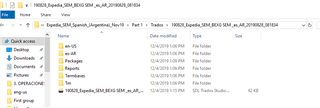
Generated Image Alt-Text
[edited by: Trados AI at 7:29 PM (GMT 0) on 28 Feb 2024]


