 Translate



Suddently, this has started happening. No idea why, but just saving or moving from segment produces 3 or 4 pop-up Windows,
I cannot therefore work in SDL untill resolved
Any ideas welcome

Suddently, this has started happening. No idea why, but just saving or moving from segment produces 3 or 4 pop-up Windows,
I cannot therefore work in SDL untill resolved
Any ideas welcome

the pop up window came back, and when I looked at the API key it had disappeared again! What is going on?
New project perhaps and you don't have DeepL in your Global settings? This isn't normal behaviour, maybe you have some security software "cleaning up the settings files for DeepL in the backgound?"
Can we see your log file?
c:\Users\[USERNAME]\AppData\Roaming\SDL\DeeplLogs\DeeplLogs.txt
Maybe there will be something in there to help identify the problem.
Paul Filkin | RWS
Design your own training!
You've done the courses and still need to go a little further, or still not clear?
Tell us what you need in our Community Solutions Hub

how do I upload it? It doesn't seem possible to upload a file on this site
It's only a text file so should be no problem at all. Like this:
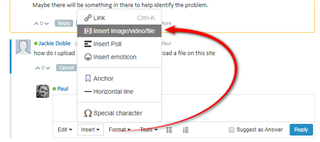
You could even try zipping it first.
Paul Filkin | RWS
Design your own training!
You've done the courses and still need to go a little further, or still not clear?
Tell us what you need in our Community Solutions Hub

Thanks... will give this to a developer tomorrow when they come in.
Paul Filkin | RWS
Design your own training!
You've done the courses and still need to go a little further, or still not clear?
Tell us what you need in our Community Solutions Hub
I also have the problem with the "Forbidden" message but cannot solve it with the suggestions from this page.
When I first tried to install the DeepL plug-in, I got an error message and it did not work at all. Then I updated Trados Studio. After that it did install, and I can select it in the Project Settings but when I do, I Keep getting the "Forbidden" message. This only disappers when I deactivate the DeepL plug-in. The DeepL key is correctly spelled, no spaces. And since it works without Problems for my colleague, it cannot be a Firewall Issue either.
Any suggestions?
This is almost certainly a DeepL problem and you should report it to them. I just tested this and I also get the same thing. There has been no changes to Studio, no changes to the plugin... the only variable here is DeepL who can change anything they like and we will not be aware of it.
Paul Filkin | RWS
Design your own training!
You've done the courses and still need to go a little further, or still not clear?
Tell us what you need in our Community Solutions Hub
In fact I solved it... just go to your settings and put your API credentials back in ;-)
Paul Filkin | RWS
Design your own training!
You've done the courses and still need to go a little further, or still not clear?
Tell us what you need in our Community Solutions Hub
Unfortunately, it does not work for me :-( In fact, I also tried that various times before but it never made a difference...