 Translate



What should I do?

RWS Community
What should I do?
Hello Ji in Sim ,
Please try resetting Studio-
Go to this location (you must be logged in as admin to do this)
Depending on your Studio version-
Studio 2017
c:\Users\[USERNAME]\AppData\Roaming\SDL\SDL Trados Studio\14.0.0.0
and rename the folder (just add _old)
Studio 2019
Please try a simple Studio reset-
Go to this location (you must be logged in as admin to do this)
c:\Users\[USERNAME]\AppData\Roaming\SDL\SDL Trados Studio\15.0.0.0
and rename the folder (just add _old)
Please let us know if this resolved the problem.
Oana Nagy | QA Engineer | RWS Group
I don’t see [Username] under C:\Users\
I don’t see [Username] under C:\Users\
Hello Ji in Sim ,
Substitute [username] with your own name- for example
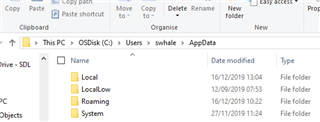
Then you can locate the folder and do the reset.
Oana Nagy | QA Engineer | RWS Group


