I cannot open Studio 2019 SR2 CU5 since I upgraded from W7 to W10

Hello Paul, hello Steven,

I thought I had found an easy (and free!) way of upgrading from Windows 7 to Windows 10, but after one day or two problems started arising. First it was MS Office (solved with a bew installation) and now SDL Trados. I will try inserting essor message and related information:
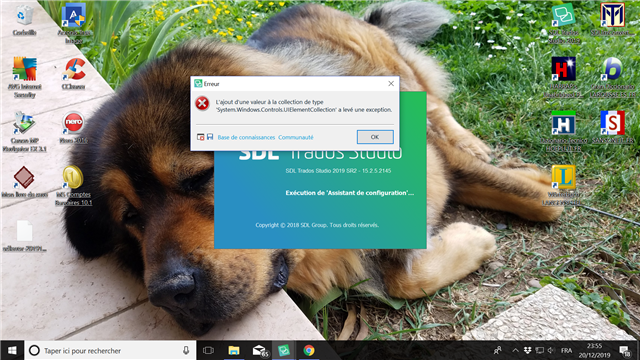
Error message on Trados Studio 2019 stating 'Object reference not set to an instance of an object' with System.Windows.Controls error details, over a desktop background featuring a sleeping dog.

Since I failed to insert the "sdlerror-20191220-19h36m38s" (I should learn how to), I will e-mail it to you both.

Thanks for your help. I hope it is an easy one.

Best regards.

Gérard


Generated Image Alt-Text
[edited by: Trados AI at 7:36 PM (GMT 0) on 28 Feb 2024]
emoji
Parents
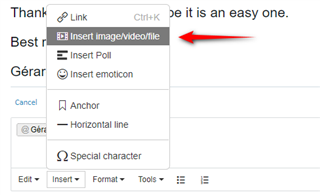
  • Just add it as a file in here:

    Dropdown menu with 'Insert imagevideofile' option highlighted and an arrow pointing towards it.

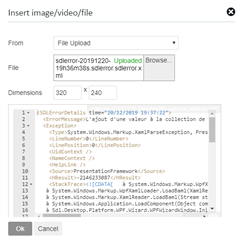
    Use the "File Upload":

    File upload dialog box with 'sdlerror-20191220-19h36m38s.sdlerror.xml' file selected for upload.

    Then it looks like this (thanks for emailing it but as I'm on leave it might make more sense to share it here for others!)

    <SDLErrorDetails time="20/12/2019 19:37:22">
      <ErrorMessage>L'ajout d'une valeur à la collection de type 'System.Windows.Controls.UIElementCollection' a levé une exception.</ErrorMessage>
      <Exception>
        <Type>System.Windows.Markup.XamlParseException, PresentationFramework, Version=4.0.0.0, Culture=neutral, PublicKeyToken=31bf3856ad364e35</Type>
        <LineNumber>0</LineNumber>
        <LinePosition>0</LinePosition>
        <UidContext />
        <NameContext />
        <HelpLink />
        <Source>PresentationFramework</Source>
        <HResult>-2146233087</HResult>
        <StackTrace><![CDATA[   à System.Windows.Markup.WpfXamlLoader.Load(XamlReader xamlReader, IXamlObjectWriterFactory writerFactory, Boolean skipJournaledProperties, Object rootObject, XamlObjectWriterSettings settings, Uri baseUri)
       à System.Windows.Markup.WpfXamlLoader.LoadBaml(XamlReader xamlReader, Boolean skipJournaledProperties, Object rootObject, XamlAccessLevel accessLevel, Uri baseUri)
       à System.Windows.Markup.XamlReader.LoadBaml(Stream stream, ParserContext parserContext, Object parent, Boolean closeStream)
       à System.Windows.Application.LoadComponent(Object component, Uri resourceLocator)
       à Sdl.Desktop.Platform.WPF.Wizard.WPFWizardWindow.InitializeComponent()
       à Sdl.TranslationStudio.Common.SetupWizard.SetupWizardLauncher.Execute()
       à Sdl.Desktop.Platform.Implementation.Studio.ExecuteStartupExtensions(ISplashScreen splashScreen)
       à Sdl.Desktop.Platform.Implementation.Studio.Run(ISplashScreen splashScreen, IEventAggregator eventAggregator)
       à Sdl.TranslationStudio.Application.Launcher.RunApplication()]]></StackTrace>
        <InnerException>
          <Type>System.Runtime.InteropServices.COMException, mscorlib, Version=4.0.0.0, Culture=neutral, PublicKeyToken=b77a5c561934e089</Type>
          <ErrorCode>-2003303418</ErrorCode>
          <HelpLink />
          <Source>PresentationCore</Source>
          <HResult>-2003303418</HResult>
          <StackTrace><![CDATA[   à System.Windows.Media.Composition.DUCE.Channel.SyncFlush()
       à System.Windows.Media.MediaContext.CompleteRender()
       à System.Windows.Media.MediaContext.CreateChannels()
       à System.Windows.Media.MediaSystem.ConnectChannels(MediaContext mc)
       à System.Windows.Media.MediaContext..ctor(Dispatcher dispatcher)
       à System.Windows.Media.MediaContext.From(Dispatcher dispatcher)
       à System.Windows.Media.Visual.VerifyAPIReadWrite()
       à System.Windows.Media.VisualCollection.Add(Visual visual)
       à System.Windows.Controls.UIElementCollection.AddInternal(UIElement element)
       à System.Windows.Controls.UIElementCollection.Add(UIElement element)
       à System.Windows.Controls.UIElementCollection.System.Collections.IList.Add(Object value)
       à System.Xaml.Schema.XamlTypeInvoker.AddToCollection(Object instance, Object item)
       à MS.Internal.Xaml.Runtime.ClrObjectRuntime.Add(Object collection, XamlType collectionType, Object value, XamlType valueXamlType)]]></StackTrace>
        </InnerException>
      </Exception>
      <Environment>
        <ProductName>SDL Trados Studio</ProductName>
        <ProductVersion>15.0.0.0</ProductVersion>
        <EntryAssemblyFileVersion>15.2.5.2145</EntryAssemblyFileVersion>
        <OperatingSystem>Microsoft Windows 10 Professionnel</OperatingSystem>
        <ServicePack>NULL</ServicePack>
        <OperatingSystemLanguage>1036</OperatingSystemLanguage>
        <CodePage>1252</CodePage>
        <LoggedOnUser>GERARDLAMBERT\home</LoggedOnUser>
        <DotNetFrameWork>4.0.30319.42000</DotNetFrameWork>
        <ComputerName>GERARDLAMBERT</ComputerName>
        <ConnectedToNetwork>True</ConnectedToNetwork>
        <PhysicalMemory>8348888 MB</PhysicalMemory>
      </Environment>
    </SDLErrorDetails>

    On your error messge... I'd try a reinstall first, or a program repair, but if that doesn't work log a case with support:

    https://gateway.sdl.com/webtocase

    Paul Filkin | RWS

    Design your own training!
    You've done the courses and still need to go a little further, or still not clear? 
    Tell us what you need in our Community Solutions Hub


    Generated Image Alt-Text
    [edited by: Trados AI at 7:36 PM (GMT 0) on 28 Feb 2024]
Reply
  • Just add it as a file in here:

    Dropdown menu with 'Insert imagevideofile' option highlighted and an arrow pointing towards it.

    Use the "File Upload":

    File upload dialog box with 'sdlerror-20191220-19h36m38s.sdlerror.xml' file selected for upload.

    Then it looks like this (thanks for emailing it but as I'm on leave it might make more sense to share it here for others!)

    <SDLErrorDetails time="20/12/2019 19:37:22">
      <ErrorMessage>L'ajout d'une valeur à la collection de type 'System.Windows.Controls.UIElementCollection' a levé une exception.</ErrorMessage>
      <Exception>
        <Type>System.Windows.Markup.XamlParseException, PresentationFramework, Version=4.0.0.0, Culture=neutral, PublicKeyToken=31bf3856ad364e35</Type>
        <LineNumber>0</LineNumber>
        <LinePosition>0</LinePosition>
        <UidContext />
        <NameContext />
        <HelpLink />
        <Source>PresentationFramework</Source>
        <HResult>-2146233087</HResult>
        <StackTrace><![CDATA[   à System.Windows.Markup.WpfXamlLoader.Load(XamlReader xamlReader, IXamlObjectWriterFactory writerFactory, Boolean skipJournaledProperties, Object rootObject, XamlObjectWriterSettings settings, Uri baseUri)
       à System.Windows.Markup.WpfXamlLoader.LoadBaml(XamlReader xamlReader, Boolean skipJournaledProperties, Object rootObject, XamlAccessLevel accessLevel, Uri baseUri)
       à System.Windows.Markup.XamlReader.LoadBaml(Stream stream, ParserContext parserContext, Object parent, Boolean closeStream)
       à System.Windows.Application.LoadComponent(Object component, Uri resourceLocator)
       à Sdl.Desktop.Platform.WPF.Wizard.WPFWizardWindow.InitializeComponent()
       à Sdl.TranslationStudio.Common.SetupWizard.SetupWizardLauncher.Execute()
       à Sdl.Desktop.Platform.Implementation.Studio.ExecuteStartupExtensions(ISplashScreen splashScreen)
       à Sdl.Desktop.Platform.Implementation.Studio.Run(ISplashScreen splashScreen, IEventAggregator eventAggregator)
       à Sdl.TranslationStudio.Application.Launcher.RunApplication()]]></StackTrace>
        <InnerException>
          <Type>System.Runtime.InteropServices.COMException, mscorlib, Version=4.0.0.0, Culture=neutral, PublicKeyToken=b77a5c561934e089</Type>
          <ErrorCode>-2003303418</ErrorCode>
          <HelpLink />
          <Source>PresentationCore</Source>
          <HResult>-2003303418</HResult>
          <StackTrace><![CDATA[   à System.Windows.Media.Composition.DUCE.Channel.SyncFlush()
       à System.Windows.Media.MediaContext.CompleteRender()
       à System.Windows.Media.MediaContext.CreateChannels()
       à System.Windows.Media.MediaSystem.ConnectChannels(MediaContext mc)
       à System.Windows.Media.MediaContext..ctor(Dispatcher dispatcher)
       à System.Windows.Media.MediaContext.From(Dispatcher dispatcher)
       à System.Windows.Media.Visual.VerifyAPIReadWrite()
       à System.Windows.Media.VisualCollection.Add(Visual visual)
       à System.Windows.Controls.UIElementCollection.AddInternal(UIElement element)
       à System.Windows.Controls.UIElementCollection.Add(UIElement element)
       à System.Windows.Controls.UIElementCollection.System.Collections.IList.Add(Object value)
       à System.Xaml.Schema.XamlTypeInvoker.AddToCollection(Object instance, Object item)
       à MS.Internal.Xaml.Runtime.ClrObjectRuntime.Add(Object collection, XamlType collectionType, Object value, XamlType valueXamlType)]]></StackTrace>
        </InnerException>
      </Exception>
      <Environment>
        <ProductName>SDL Trados Studio</ProductName>
        <ProductVersion>15.0.0.0</ProductVersion>
        <EntryAssemblyFileVersion>15.2.5.2145</EntryAssemblyFileVersion>
        <OperatingSystem>Microsoft Windows 10 Professionnel</OperatingSystem>
        <ServicePack>NULL</ServicePack>
        <OperatingSystemLanguage>1036</OperatingSystemLanguage>
        <CodePage>1252</CodePage>
        <LoggedOnUser>GERARDLAMBERT\home</LoggedOnUser>
        <DotNetFrameWork>4.0.30319.42000</DotNetFrameWork>
        <ComputerName>GERARDLAMBERT</ComputerName>
        <ConnectedToNetwork>True</ConnectedToNetwork>
        <PhysicalMemory>8348888 MB</PhysicalMemory>
      </Environment>
    </SDLErrorDetails>

    On your error messge... I'd try a reinstall first, or a program repair, but if that doesn't work log a case with support:

    https://gateway.sdl.com/webtocase

    Paul Filkin | RWS

    Design your own training!
    You've done the courses and still need to go a little further, or still not clear? 
    Tell us what you need in our Community Solutions Hub


    Generated Image Alt-Text
    [edited by: Trados AI at 7:36 PM (GMT 0) on 28 Feb 2024]
Children