Translate



After a weird "Key already exists. Parameter name: Key" error which scrambled my layout in Trados 2019, I managed to solve it by doing absolutely nothing apart from closing and opening a different Trados project. At the third or fourth attempt, trying to open different files from different folders, the issue was magically solved. However, I noticed that Trados stopped recognizing and using some SDLX Translation Memories (with the corresponding Appstore plugin I had). I also have Community Advanced Display Filter installed and the view of my Project Settings screen is this:
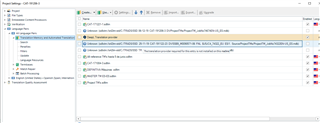
I assure you that the files do exist (of course, not in the sdlxtm://s42-std/C:..." folder but in the same folder as always, without the "sdlxtm://s42-std" part.
I did nothing to cause this error, I was working normally. Well, perhaps I disabled Microsoft Windows task from the Task Manager as it was creating some issues.
Edit: It seems the error messed up with the SDLX TM plugin, which, by the way, is unsigned...
Generated Image Alt-Text
[edited by: Trados AI at 7:36 PM (GMT 0) on 28 Feb 2024]